Webhooks send HTTP requests to your server when events occur in H0p. Use them to sync data with your systems, trigger automations, or build real-time integrations.
Webhooks are a Premium feature.

How webhooks work

1

Event occurs

Something happens in H0p (link created, clicked, etc.)
2

H0p sends request

An HTTP POST request is sent to your webhook URL with event data.
3

Your server responds

Your server processes the event and returns a 2xx status code.

Available events

EventDescriptionTrigger
link.createdNew short link createdDashboard or API
link.updatedShort link modifiedDashboard or API
link.deletedShort link removedDashboard or API
link.clickedSomeone clicked a linkLink visitor

Creating a webhook

1

Go to Webhooks

Navigate to Webhooks in the sidebar under Developer Tools.
2

Click Create Webhook

Click the Create Webhook button to open the configuration form.
3

Enter your endpoint URL

Provide the URL where H0p should send events:
https://your-server.com/api/webhooks/h0p
Your endpoint must use HTTPS. HTTP endpoints are not supported.
4

Select events

Choose which events should trigger this webhook:
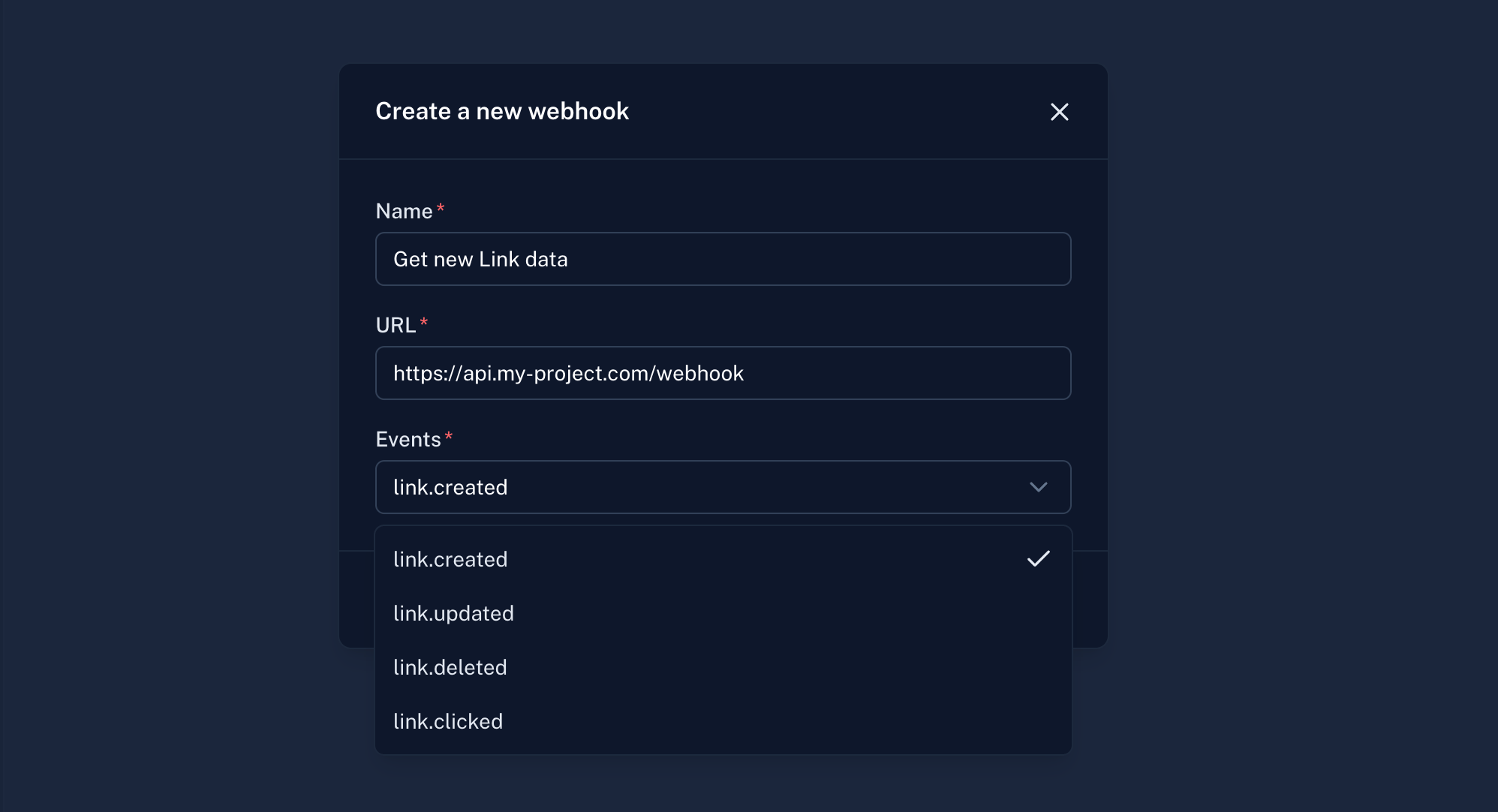
  • Check specific events (recommended)
  • Or select all events
Webhook Creation Form
5

Save the webhook

Click Create to save. H0p will provide a webhook secret for signature verification.
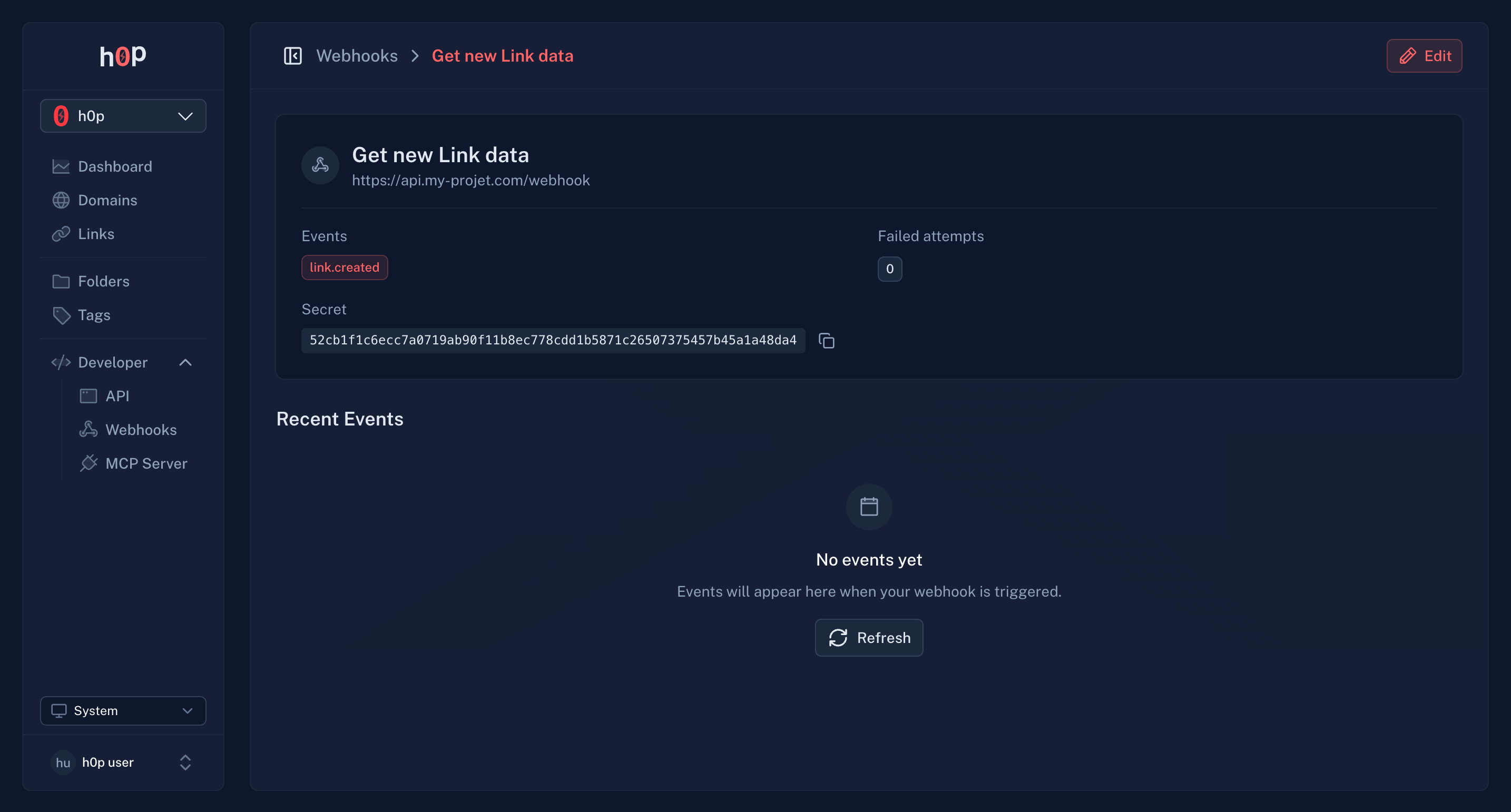
Store the webhook secret securely. You’ll need it to verify incoming requests.
Webhook Creation Form

Event payloads

All webhook payloads follow this structure:
{
  "id": "evt_abc123",
  "type": "link.created",
  "createdAt": "2024-01-15T10:30:00Z",
  "data": {
    // Event-specific data
  }
}
Sent when a new short link is created:
{
  "id": "evt_abc123",
  "type": "link.created",
  "createdAt": "2024-01-15T10:30:00Z",
  "data": {
    "link": {
      "id": "link_xyz789",
      "slug": "my-promo",
      "shortUrl": "https://links.company.com/my-promo",
      "destination": {
        "type": "link",
        "value": "https://example.com/landing"
      },
      "createdAt": "2024-01-15T10:30:00Z"
    }
  }
}
Sent when a short link is modified:
{
  "id": "evt_def456",
  "type": "link.updated",
  "createdAt": "2024-01-15T11:00:00Z",
  "data": {
    "link": {
      "id": "link_xyz789",
      "slug": "my-promo",
      "shortUrl": "https://links.company.com/my-promo",
      "destination": {
        "type": "link",
        "value": "https://example.com/new-landing"
      },
      "updatedAt": "2024-01-15T11:00:00Z"
    }
  }
}
Sent when a short link is deleted:
{
  "id": "evt_ghi789",
  "type": "link.deleted",
  "createdAt": "2024-01-15T12:00:00Z",
  "data": {
    "link": {
      "id": "link_xyz789",
      "slug": "my-promo",
      "deletedAt": "2024-01-15T12:00:00Z"
    }
  }
}
Sent when someone clicks a short link:
{
  "id": "evt_jkl012",
  "type": "link.clicked",
  "createdAt": "2024-01-15T14:30:00Z",
  "data": {
    "link": {
      "id": "link_xyz789",
      "slug": "my-promo"
    },
    "click": {
      "country": "US",
      "city": "San Francisco",
      "region": "California",
      "device": "mobile",
      "browser": "Chrome",
      "os": "iOS",
      "referer": "https://twitter.com",
      "utmSource": "twitter",
      "utmMedium": "social",
      "utmCampaign": "spring_launch",
      "isQrCode": false,
      "clickedAt": "2024-01-15T14:30:00Z"
    }
  }
}

Verifying webhook signatures

Every webhook request includes a signature header for verification. This ensures the request came from H0p and wasn’t tampered with.

Signature header

X-H0p-Signature: sha256=abc123...

Verification example

const crypto = require('crypto');

function verifyWebhook(payload, signature, secret) {
  const expectedSignature = crypto
    .createHmac('sha256', secret)
    .update(payload)
    .digest('hex');

  const trusted = `sha256=${expectedSignature}`;
  return crypto.timingSafeEqual(
    Buffer.from(signature),
    Buffer.from(trusted)
  );
}

// In your webhook handler
app.post('/webhook', (req, res) => {
  const signature = req.headers['x-h0p-signature'];
  const payload = JSON.stringify(req.body);

  if (!verifyWebhook(payload, signature, WEBHOOK_SECRET)) {
    return res.status(401).send('Invalid signature');
  }

  // Process the event
  const event = req.body;
  console.log(`Received ${event.type} event`);

  res.status(200).send('OK');
});
Always verify webhook signatures in production. Never trust webhook data without verification.

Retry behavior

If your server doesn’t respond with a 2xx status code, H0p retries with exponential backoff:
AttemptDelay
1Immediate
212 seconds
3~2.5 minutes
4~30 minutes
5~6 hours
624 hours
After 18 consecutive failures (6 attempts x 3), the webhook is automatically disabled to prevent further failed deliveries.
You’ll receive an email notification when a webhook is disabled due to failures.

Monitoring webhooks

Delivery history

View recent webhook deliveries in the webhook details page:
  • Event type - Which event triggered the delivery
  • Status - Success or failure
  • Response code - HTTP status returned by your server
  • Timestamp - When the delivery was attempted
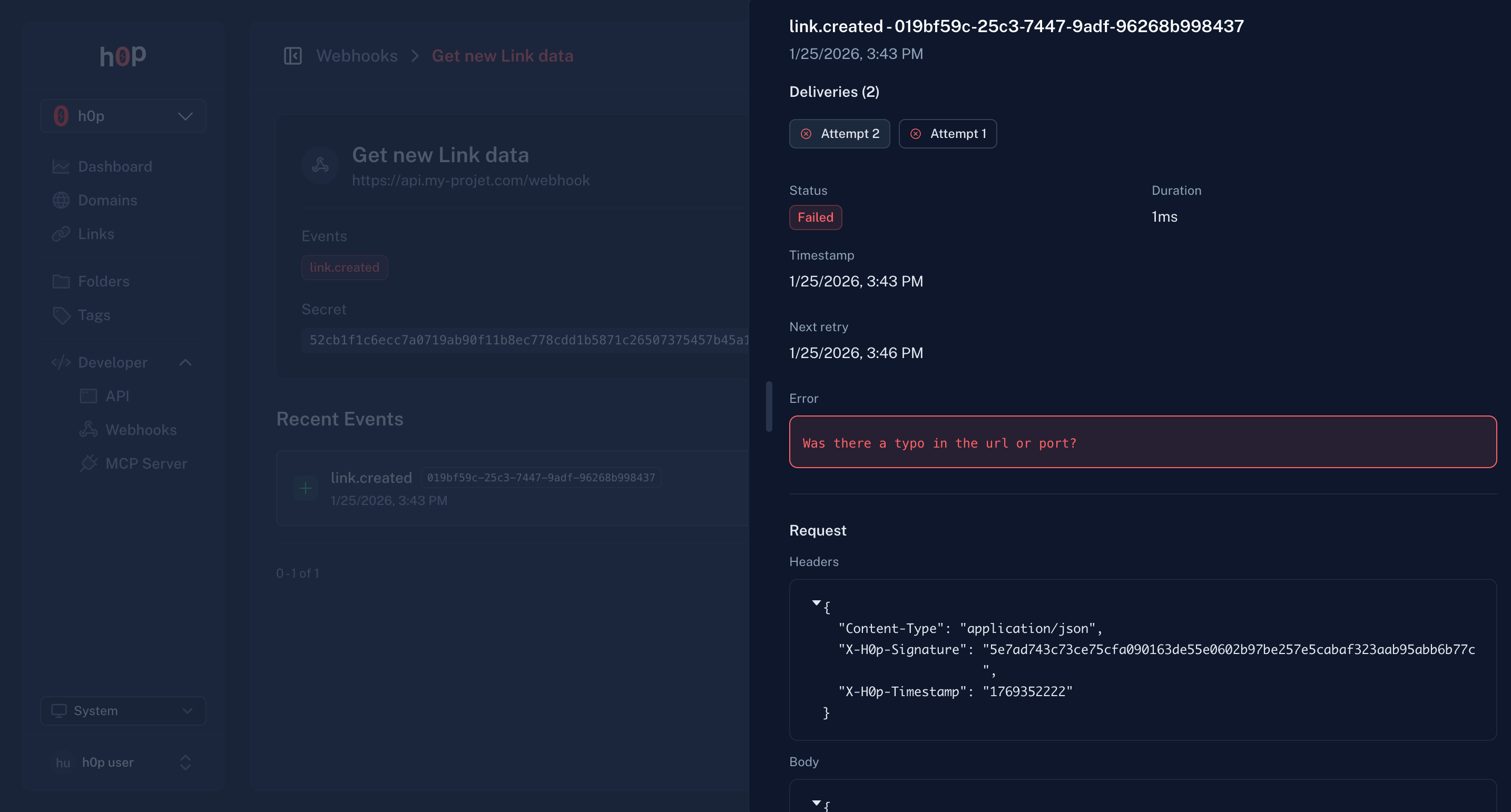
Webhook Delivery History

Re-enable disabled webhooks

If a webhook is disabled due to failures:
  1. Fix the issue with your endpoint
  2. Go to the webhook settings
  3. Toggle the webhook back on
  4. The failure counter resets

Best practices

Return a 2xx response as quickly as possible. Process events asynchronously in a queue.
app.post('/webhook', async (req, res) => {
  // Acknowledge immediately
  res.status(200).send('OK');

  // Process async
  await queue.add('process-webhook', req.body);
});
Network issues can cause duplicate deliveries. Use the event id to deduplicate:
if (await hasProcessedEvent(event.id)) {
  return; // Already processed
}
Only process events you expect. Ignore unknown event types gracefully:
switch (event.type) {
  case 'link.created':
    await handleLinkCreated(event);
    break;
  case 'link.clicked':
    await handleLinkClicked(event);
    break;
  default:
    console.log(`Unknown event type: ${event.type}`);
}
Always use HTTPS endpoints. HTTP is not supported and exposes your data.
Use environment variables or a secrets manager. Never commit secrets to version control.

Testing webhooks

Local development

Use a tunneling service to expose your local server:
# Install ngrok
brew install ngrok

# Start your local server
npm run dev

# Expose it
ngrok http 3000
Use the ngrok URL (e.g., https://abc123.ngrok.io/webhook) as your webhook endpoint.

Webhook testing tools

  1. Create a webhook with a test endpoint
  2. Trigger an event (create a link)
  3. Check the delivery history for the request/response

Limits

LimitValue
Webhooks per organization50
Concurrent deliveries10
Request timeout30 seconds
Max retries6

API access

Manage webhooks programmatically:
# Create webhook
curl -X POST https://api.h0p.co/webhook \
  -H "x-api-key: YOUR_API_KEY" \
  -H "Content-Type: application/json" \
  -d '{
    "url": "https://your-server.com/webhook",
    "events": ["link.created", "link.clicked"]
  }'

# List webhooks
curl https://api.h0p.co/webhook/list \
  -H "x-api-key: YOUR_API_KEY"
See the API Reference for complete documentation.