This guide walks you through making your first H0p API calls. You’ll create an API key, list your domains, create a short link, and retrieve analytics.

Prerequisites

Before you begin, make sure you have:
  • A H0p account (sign up here)
  • A Premium subscription (required for API access)
  • A tool to make HTTP requests (cURL, Postman, or your favorite HTTP client)

Step 1: Create your API key

API keys are managed in the H0p dashboard under Developer Tools.
1

Navigate to API Keys

Go to Developer Tools > API Keys in the sidebar.
2

Create a new key

Click Create API Key and choose a key type:
  • User key - Linked to your account, for personal use
  • Bot key - Autonomous machine user, for production systems
3

Configure permissions

Select the permissions your key needs:
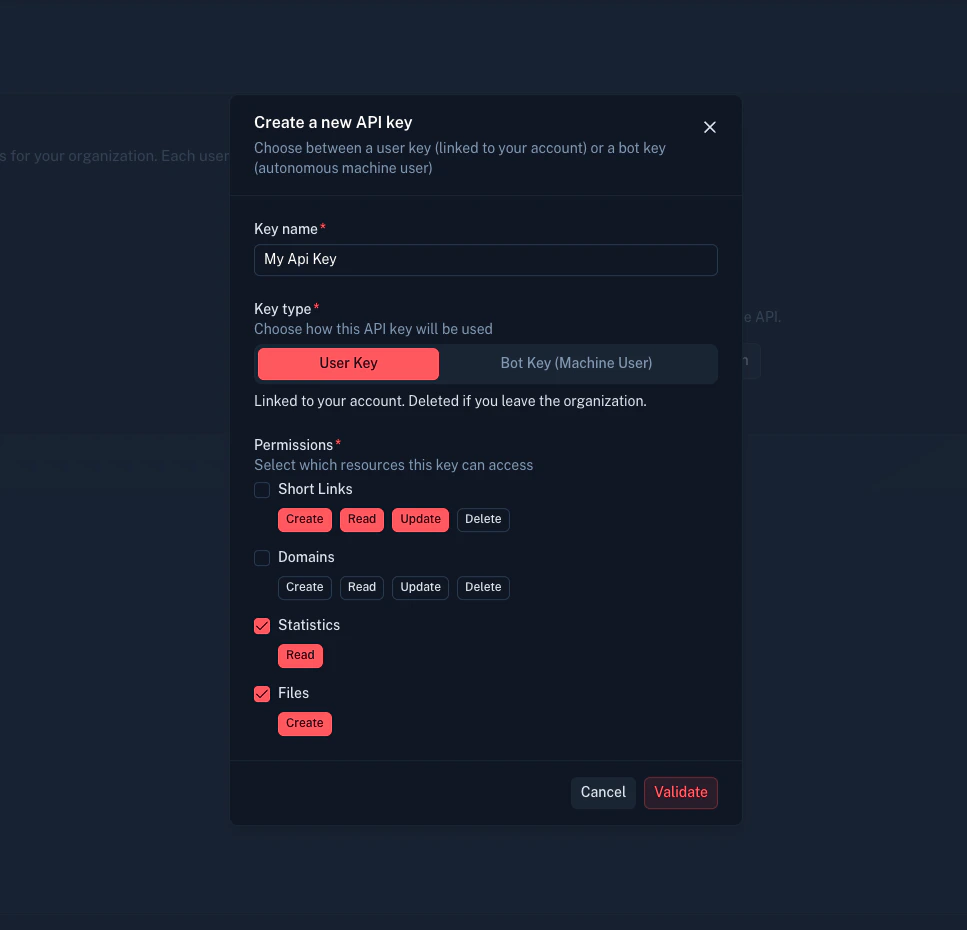
ResourceActions
Short linkscreate, read, update, delete
Domainscreate, read, update, delete
Statsread
Filescreate, read
Follow the principle of least privilege. Only grant permissions your integration needs.
Creating an API key in the H0p dashboard
4

Copy your key

Your API key is shown only once. Copy it and store it securely (e.g., in environment variables or a secrets manager).
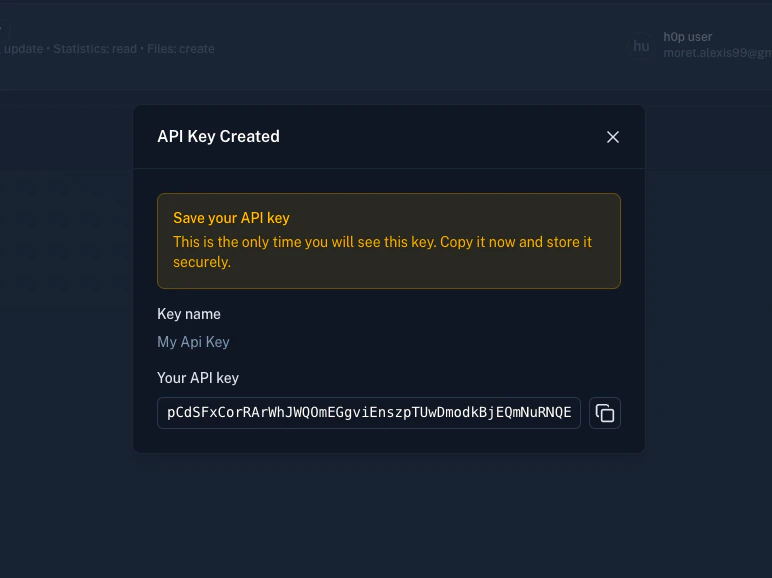
Creating an API key in the H0p dashboard
Your API key is shown only once. If you lose it, you’ll need to create a new one.

Step 2: List your domains

Let’s verify your API key works by listing your available domains:
curl -X GET "https://api.h0p.co/domain/list?page=0&limit=10" \
  -H "x-api-key: YOUR_API_KEY"
Response:
{
  "items": [
    {
      "id": "550e8400-e29b-41d4-a716-446655440000",
      "domain": "h0p.co",
      "isVerified": true,
      "isPrimary": true,
      "createdAt": "2024-01-01T00:00:00.000Z"
    }
  ],
  "pagination": {
    "page": 0,
    "limit": 10,
    "totalItems": 1,
    "totalPages": 1
  }
}
If you see a response like this, your API key is working. Note the id of the domain you want to use for creating links. Now create a short link. The request requires a destination object and optionally a custom slug:
curl -X POST "https://api.h0p.co/short-link" \
  -H "x-api-key: YOUR_API_KEY" \
  -H "Content-Type: application/json" \
  -d '{
    "destination": {
      "type": "link",
      "value": "https://example.com/my-landing-page"
    },
    "slug": "my-first-link",
    "domainId": "550e8400-e29b-41d4-a716-446655440000"
  }'
Request body fields:
FieldTypeRequiredDescription
destination.typestringYeslink, mail, or phone
destination.valuestringYesThe target URL, email, or phone
slugstringNoCustom slug (auto-generated if omitted)
domainIdstringNoDomain UUID (uses primary if omitted)
Response:
{
  "id": "660e8400-e29b-41d4-a716-446655440001",
  "slug": "my-first-link",
  "shortUrl": "https://h0p.co/my-first-link",
  "destination": {
    "id": "770e8400-e29b-41d4-a716-446655440002",
    "type": "link",
    "value": "https://example.com/my-landing-page"
  },
  "domain": {
    "id": "550e8400-e29b-41d4-a716-446655440000",
    "domain": "h0p.co"
  },
  "clicks": 0,
  "createdAt": "2024-01-15T10:30:00.000Z"
}
Your short link is now live at https://h0p.co/my-first-link. Create a link with UTM parameters, tags, and other options:
curl -X POST "https://api.h0p.co/short-link" \
  -H "x-api-key: YOUR_API_KEY" \
  -H "Content-Type: application/json" \
  -d '{
    "destination": {
      "type": "link",
      "value": "https://example.com/product"
    },
    "slug": "spring-sale",
    "domainId": "550e8400-e29b-41d4-a716-446655440000",
    "tags": ["marketing", "spring-2024"],
    "utmSource": "email",
    "utmMedium": "newsletter",
    "utmCampaign": "spring_sale"
  }'
UTM parameters are automatically appended to the destination URL when visitors click the link. Retrieve click statistics using the stats endpoint:
curl -X GET "https://api.h0p.co/stats/overview?startDate=2024-01-01T00:00:00Z&endDate=2024-01-31T23:59:59Z&groupBy=country&shortLinkIds=660e8400-e29b-41d4-a716-446655440001" \
  -H "x-api-key: YOUR_API_KEY"
Query parameters:
ParameterTypeRequiredDescription
startDateISO dateYesStart of date range
endDateISO dateYesEnd of date range
groupBystringYesDimension to group by
shortLinkIdsstringNoFilter by specific link IDs
Available groupBy values:
  • country, city, region, continent
  • device, browser, os
  • referer, utmSource, utmMedium, utmCampaign
  • shortLinks, uniqueVisitors
Response:
{
  "data": [
    { "country": "US", "clicks": 150 },
    { "country": "GB", "clicks": 45 },
    { "country": "FR", "clicks": 32 },
    { "country": "DE", "clicks": 28 }
  ],
  "totalClicks": 255
}

Get clicks over time

For time-series data:
curl -X GET "https://api.h0p.co/stats/clicks-over-time?startDate=2024-01-01T00:00:00Z&endDate=2024-01-31T23:59:59Z" \
  -H "x-api-key: YOUR_API_KEY"
Response:
{
  "data": [
    { "date": "2024-01-01", "clicks": 12 },
    { "date": "2024-01-02", "clicks": 18 },
    { "date": "2024-01-03", "clicks": 25 }
  ]
}
Modify an existing link’s destination or settings:
curl -X PATCH "https://api.h0p.co/short-link/660e8400-e29b-41d4-a716-446655440001" \
  -H "x-api-key: YOUR_API_KEY" \
  -H "Content-Type: application/json" \
  -d '{
    "destination": {
      "type": "link",
      "value": "https://example.com/new-landing-page"
    }
  }'
Remove a link when it’s no longer needed:
curl -X DELETE "https://api.h0p.co/short-link/660e8400-e29b-41d4-a716-446655440001" \
  -H "x-api-key: YOUR_API_KEY"
Response: 204 No Content on success.

Next steps

Authentication

Learn about API key types, permissions, and security best practices.

Short links API

Explore advanced link features like routing rules, password protection, and expiration.

Domains API

Add custom domains and configure deep linking.

Webhooks

Set up real-time notifications for link events.

Code examples

const API_KEY = process.env.H0P_API_KEY;
const BASE_URL = 'https://api.h0p.co';

async function createShortLink(destination, slug) {
  const response = await fetch(`${BASE_URL}/short-link`, {
    method: 'POST',
    headers: {
      'x-api-key': API_KEY,
      'Content-Type': 'application/json'
    },
    body: JSON.stringify({
      destination: {
        type: 'link',
        value: destination
      },
      slug
    })
  });

  if (!response.ok) {
    const error = await response.json();
    throw new Error(error.error?.message || 'Failed to create link');
  }

  return response.json();
}

// Usage
const link = await createShortLink('https://example.com', 'my-link');
console.log(link.shortUrl); // https://h0p.co/my-link

Troubleshooting

Possible causes:
  • Missing x-api-key header
  • Typo in the API key
  • Key has been revoked
  • Using wrong header name (use x-api-key, not Authorization)
Solution: Verify your API key in the dashboard and ensure it’s being sent correctly.
Possible causes:
  • API key doesn’t have required permissions
  • Trying to access resources from another organization
  • Premium feature on Free plan
Solution: Check your key permissions in the dashboard or upgrade your plan.
Possible causes:
  • Slug already exists
Solution: Use a different slug or omit it to auto-generate one.
Solution: Implement exponential backoff and wait before retrying.
Still stuck? Contact us at contact@h0p.co.