> ## Documentation Index
> Fetch the complete documentation index at: https://docs.h0p.co/llms.txt
> Use this file to discover all available pages before exploring further.
# Webhooks
> Receive real-time notifications for link events
Webhooks send HTTP requests to your server when events occur in H0p. Use them to sync data with your systems, trigger automations, or build real-time integrations.
Webhooks are a Premium feature.
## How webhooks work
Something happens in H0p (link created, clicked, etc.)
An HTTP POST request is sent to your webhook URL with event data.
Your server processes the event and returns a 2xx status code.
```mermaid theme={null}
sequenceDiagram
participant H0p
participant Your Server
H0p->>Your Server: POST /webhook (event data)
Your Server->>H0p: 200 OK
```
## Available events
| Event | Description | Trigger |
| -------------- | ---------------------- | ---------------- |
| `link.created` | New short link created | Dashboard or API |
| `link.updated` | Short link modified | Dashboard or API |
| `link.deleted` | Short link removed | Dashboard or API |
| `link.clicked` | Someone clicked a link | Link visitor |
## Creating a webhook
Navigate to **Webhooks** in the sidebar under Developer Tools.
Click the **Create Webhook** button to open the configuration form.
Provide the URL where H0p should send events:
```
https://your-server.com/api/webhooks/h0p
```
Your endpoint must use HTTPS. HTTP endpoints are not supported.
Choose which events should trigger this webhook:
* Check specific events (recommended)
* Or select all events
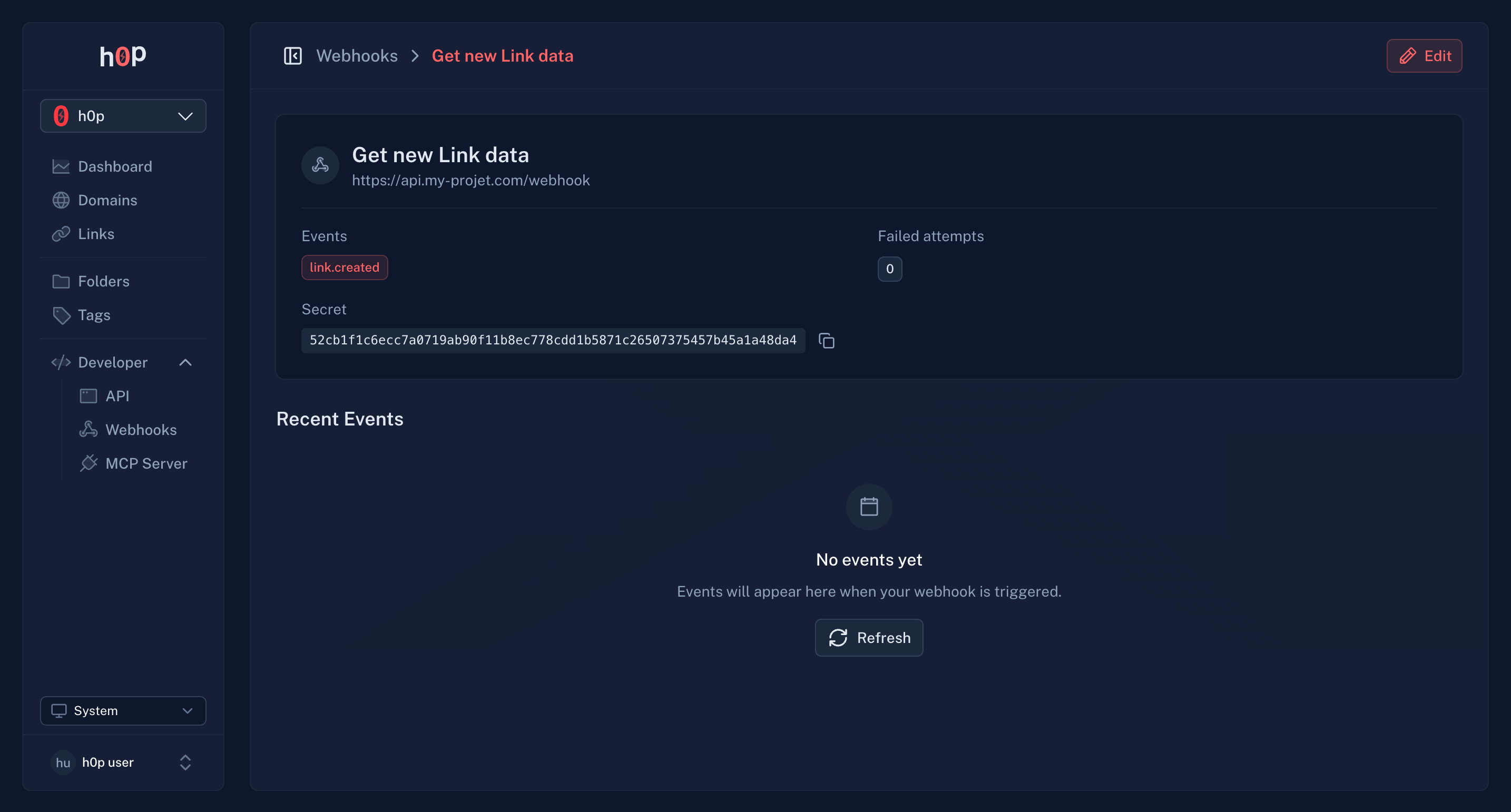
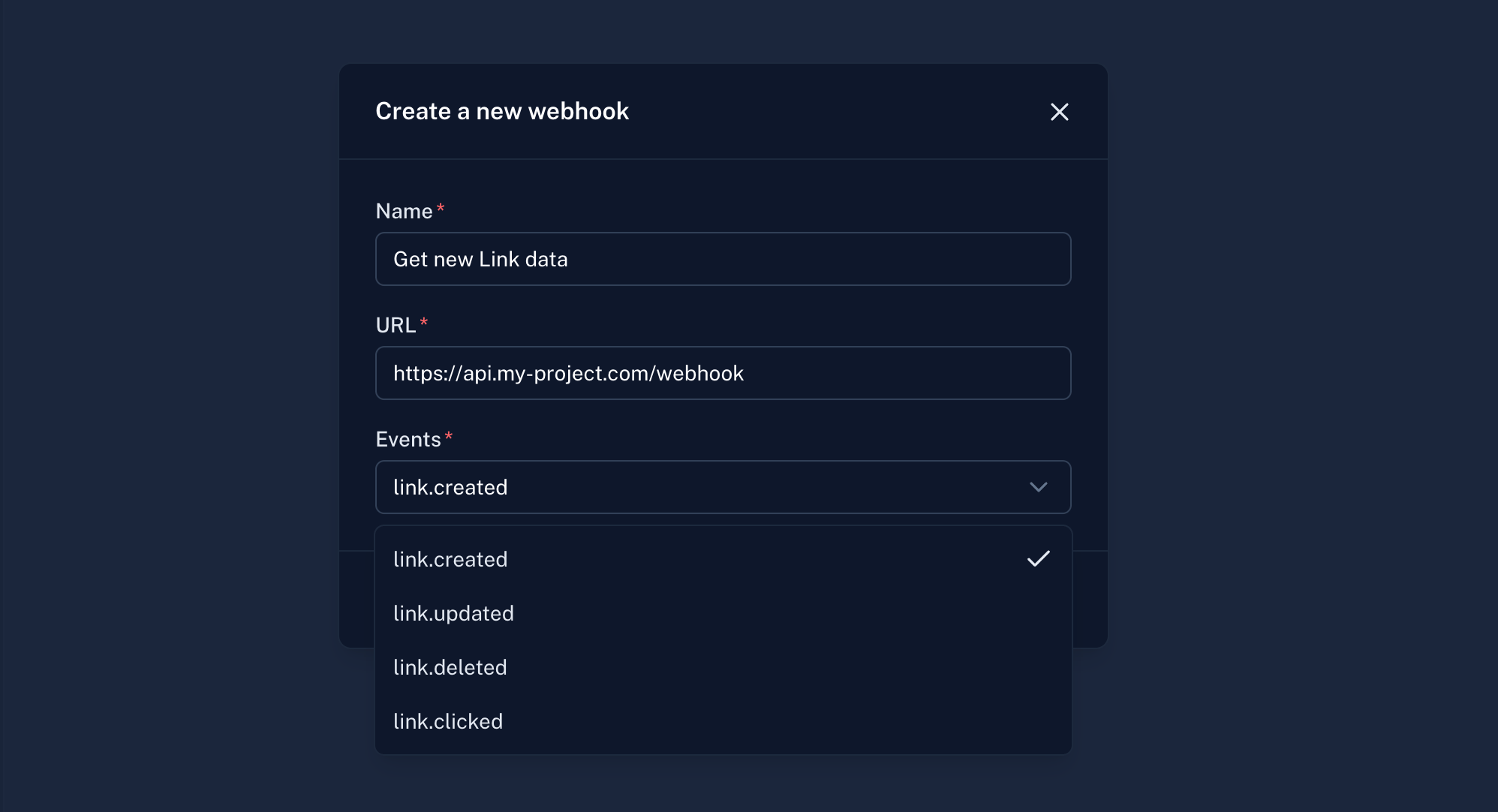 Click **Create** to save. H0p will provide a webhook secret for signature verification.
Store the webhook secret securely. You'll need it to verify incoming requests.
Click **Create** to save. H0p will provide a webhook secret for signature verification.
Store the webhook secret securely. You'll need it to verify incoming requests.
 ## Event payloads
All webhook payloads follow this structure:
```json theme={null}
{
"id": "evt_abc123",
"type": "link.created",
"createdAt": "2024-01-15T10:30:00Z",
"data": {
// Event-specific data
}
}
```
### link.created
Sent when a new short link is created:
```json theme={null}
{
"id": "evt_abc123",
"type": "link.created",
"createdAt": "2024-01-15T10:30:00Z",
"data": {
"link": {
"id": "link_xyz789",
"slug": "my-promo",
"shortUrl": "https://links.company.com/my-promo",
"destination": {
"type": "link",
"value": "https://example.com/landing"
},
"createdAt": "2024-01-15T10:30:00Z"
}
}
}
```
### link.updated
Sent when a short link is modified:
```json theme={null}
{
"id": "evt_def456",
"type": "link.updated",
"createdAt": "2024-01-15T11:00:00Z",
"data": {
"link": {
"id": "link_xyz789",
"slug": "my-promo",
"shortUrl": "https://links.company.com/my-promo",
"destination": {
"type": "link",
"value": "https://example.com/new-landing"
},
"updatedAt": "2024-01-15T11:00:00Z"
}
}
}
```
### link.deleted
Sent when a short link is deleted:
```json theme={null}
{
"id": "evt_ghi789",
"type": "link.deleted",
"createdAt": "2024-01-15T12:00:00Z",
"data": {
"link": {
"id": "link_xyz789",
"slug": "my-promo",
"deletedAt": "2024-01-15T12:00:00Z"
}
}
}
```
### link.clicked
Sent when someone clicks a short link:
```json theme={null}
{
"id": "evt_jkl012",
"type": "link.clicked",
"createdAt": "2024-01-15T14:30:00Z",
"data": {
"link": {
"id": "link_xyz789",
"slug": "my-promo"
},
"click": {
"country": "US",
"city": "San Francisco",
"region": "California",
"device": "mobile",
"browser": "Chrome",
"os": "iOS",
"referer": "https://twitter.com",
"utmSource": "twitter",
"utmMedium": "social",
"utmCampaign": "spring_launch",
"isQrCode": false,
"clickedAt": "2024-01-15T14:30:00Z"
}
}
}
```
## Verifying webhook signatures
Every webhook request includes a signature header for verification. This ensures the request came from H0p and wasn't tampered with.
### Signature header
```
X-H0p-Signature: sha256=abc123...
```
### Verification example
```javascript theme={null}
const crypto = require('crypto');
function verifyWebhook(payload, signature, secret) {
const expectedSignature = crypto
.createHmac('sha256', secret)
.update(payload)
.digest('hex');
const trusted = `sha256=${expectedSignature}`;
return crypto.timingSafeEqual(
Buffer.from(signature),
Buffer.from(trusted)
);
}
// In your webhook handler
app.post('/webhook', (req, res) => {
const signature = req.headers['x-h0p-signature'];
const payload = JSON.stringify(req.body);
if (!verifyWebhook(payload, signature, WEBHOOK_SECRET)) {
return res.status(401).send('Invalid signature');
}
// Process the event
const event = req.body;
console.log(`Received ${event.type} event`);
res.status(200).send('OK');
});
```
```python theme={null}
import hmac
import hashlib
def verify_webhook(payload: bytes, signature: str, secret: str) -> bool:
expected = hmac.new(
secret.encode(),
payload,
hashlib.sha256
).hexdigest()
trusted = f"sha256={expected}"
return hmac.compare_digest(signature, trusted)
# In your webhook handler
@app.post("/webhook")
def webhook_handler(request):
signature = request.headers.get("X-H0p-Signature")
payload = request.body
if not verify_webhook(payload, signature, WEBHOOK_SECRET):
return Response(status_code=401)
event = request.json()
print(f"Received {event['type']} event")
return Response(status_code=200)
```
```go theme={null}
package main
import (
"crypto/hmac"
"crypto/sha256"
"encoding/hex"
"net/http"
)
func verifyWebhook(payload []byte, signature, secret string) bool {
mac := hmac.New(sha256.New, []byte(secret))
mac.Write(payload)
expected := "sha256=" + hex.EncodeToString(mac.Sum(nil))
return hmac.Equal([]byte(signature), []byte(expected))
}
func webhookHandler(w http.ResponseWriter, r *http.Request) {
signature := r.Header.Get("X-H0p-Signature")
payload, _ := io.ReadAll(r.Body)
if !verifyWebhook(payload, signature, webhookSecret) {
w.WriteHeader(http.StatusUnauthorized)
return
}
// Process the event
w.WriteHeader(http.StatusOK)
}
```
Always verify webhook signatures in production. Never trust webhook data without verification.
## Retry behavior
If your server doesn't respond with a 2xx status code, H0p retries with exponential backoff:
| Attempt | Delay |
| ------- | ------------- |
| 1 | Immediate |
| 2 | 12 seconds |
| 3 | \~2.5 minutes |
| 4 | \~30 minutes |
| 5 | \~6 hours |
| 6 | 24 hours |
After 18 consecutive failures (6 attempts x 3), the webhook is automatically disabled to prevent further failed deliveries.
You'll receive an email notification when a webhook is disabled due to failures.
## Monitoring webhooks
### Delivery history
View recent webhook deliveries in the webhook details page:
* **Event type** - Which event triggered the delivery
* **Status** - Success or failure
* **Response code** - HTTP status returned by your server
* **Timestamp** - When the delivery was attempted
## Event payloads
All webhook payloads follow this structure:
```json theme={null}
{
"id": "evt_abc123",
"type": "link.created",
"createdAt": "2024-01-15T10:30:00Z",
"data": {
// Event-specific data
}
}
```
### link.created
Sent when a new short link is created:
```json theme={null}
{
"id": "evt_abc123",
"type": "link.created",
"createdAt": "2024-01-15T10:30:00Z",
"data": {
"link": {
"id": "link_xyz789",
"slug": "my-promo",
"shortUrl": "https://links.company.com/my-promo",
"destination": {
"type": "link",
"value": "https://example.com/landing"
},
"createdAt": "2024-01-15T10:30:00Z"
}
}
}
```
### link.updated
Sent when a short link is modified:
```json theme={null}
{
"id": "evt_def456",
"type": "link.updated",
"createdAt": "2024-01-15T11:00:00Z",
"data": {
"link": {
"id": "link_xyz789",
"slug": "my-promo",
"shortUrl": "https://links.company.com/my-promo",
"destination": {
"type": "link",
"value": "https://example.com/new-landing"
},
"updatedAt": "2024-01-15T11:00:00Z"
}
}
}
```
### link.deleted
Sent when a short link is deleted:
```json theme={null}
{
"id": "evt_ghi789",
"type": "link.deleted",
"createdAt": "2024-01-15T12:00:00Z",
"data": {
"link": {
"id": "link_xyz789",
"slug": "my-promo",
"deletedAt": "2024-01-15T12:00:00Z"
}
}
}
```
### link.clicked
Sent when someone clicks a short link:
```json theme={null}
{
"id": "evt_jkl012",
"type": "link.clicked",
"createdAt": "2024-01-15T14:30:00Z",
"data": {
"link": {
"id": "link_xyz789",
"slug": "my-promo"
},
"click": {
"country": "US",
"city": "San Francisco",
"region": "California",
"device": "mobile",
"browser": "Chrome",
"os": "iOS",
"referer": "https://twitter.com",
"utmSource": "twitter",
"utmMedium": "social",
"utmCampaign": "spring_launch",
"isQrCode": false,
"clickedAt": "2024-01-15T14:30:00Z"
}
}
}
```
## Verifying webhook signatures
Every webhook request includes a signature header for verification. This ensures the request came from H0p and wasn't tampered with.
### Signature header
```
X-H0p-Signature: sha256=abc123...
```
### Verification example
```javascript theme={null}
const crypto = require('crypto');
function verifyWebhook(payload, signature, secret) {
const expectedSignature = crypto
.createHmac('sha256', secret)
.update(payload)
.digest('hex');
const trusted = `sha256=${expectedSignature}`;
return crypto.timingSafeEqual(
Buffer.from(signature),
Buffer.from(trusted)
);
}
// In your webhook handler
app.post('/webhook', (req, res) => {
const signature = req.headers['x-h0p-signature'];
const payload = JSON.stringify(req.body);
if (!verifyWebhook(payload, signature, WEBHOOK_SECRET)) {
return res.status(401).send('Invalid signature');
}
// Process the event
const event = req.body;
console.log(`Received ${event.type} event`);
res.status(200).send('OK');
});
```
```python theme={null}
import hmac
import hashlib
def verify_webhook(payload: bytes, signature: str, secret: str) -> bool:
expected = hmac.new(
secret.encode(),
payload,
hashlib.sha256
).hexdigest()
trusted = f"sha256={expected}"
return hmac.compare_digest(signature, trusted)
# In your webhook handler
@app.post("/webhook")
def webhook_handler(request):
signature = request.headers.get("X-H0p-Signature")
payload = request.body
if not verify_webhook(payload, signature, WEBHOOK_SECRET):
return Response(status_code=401)
event = request.json()
print(f"Received {event['type']} event")
return Response(status_code=200)
```
```go theme={null}
package main
import (
"crypto/hmac"
"crypto/sha256"
"encoding/hex"
"net/http"
)
func verifyWebhook(payload []byte, signature, secret string) bool {
mac := hmac.New(sha256.New, []byte(secret))
mac.Write(payload)
expected := "sha256=" + hex.EncodeToString(mac.Sum(nil))
return hmac.Equal([]byte(signature), []byte(expected))
}
func webhookHandler(w http.ResponseWriter, r *http.Request) {
signature := r.Header.Get("X-H0p-Signature")
payload, _ := io.ReadAll(r.Body)
if !verifyWebhook(payload, signature, webhookSecret) {
w.WriteHeader(http.StatusUnauthorized)
return
}
// Process the event
w.WriteHeader(http.StatusOK)
}
```
Always verify webhook signatures in production. Never trust webhook data without verification.
## Retry behavior
If your server doesn't respond with a 2xx status code, H0p retries with exponential backoff:
| Attempt | Delay |
| ------- | ------------- |
| 1 | Immediate |
| 2 | 12 seconds |
| 3 | \~2.5 minutes |
| 4 | \~30 minutes |
| 5 | \~6 hours |
| 6 | 24 hours |
After 18 consecutive failures (6 attempts x 3), the webhook is automatically disabled to prevent further failed deliveries.
You'll receive an email notification when a webhook is disabled due to failures.
## Monitoring webhooks
### Delivery history
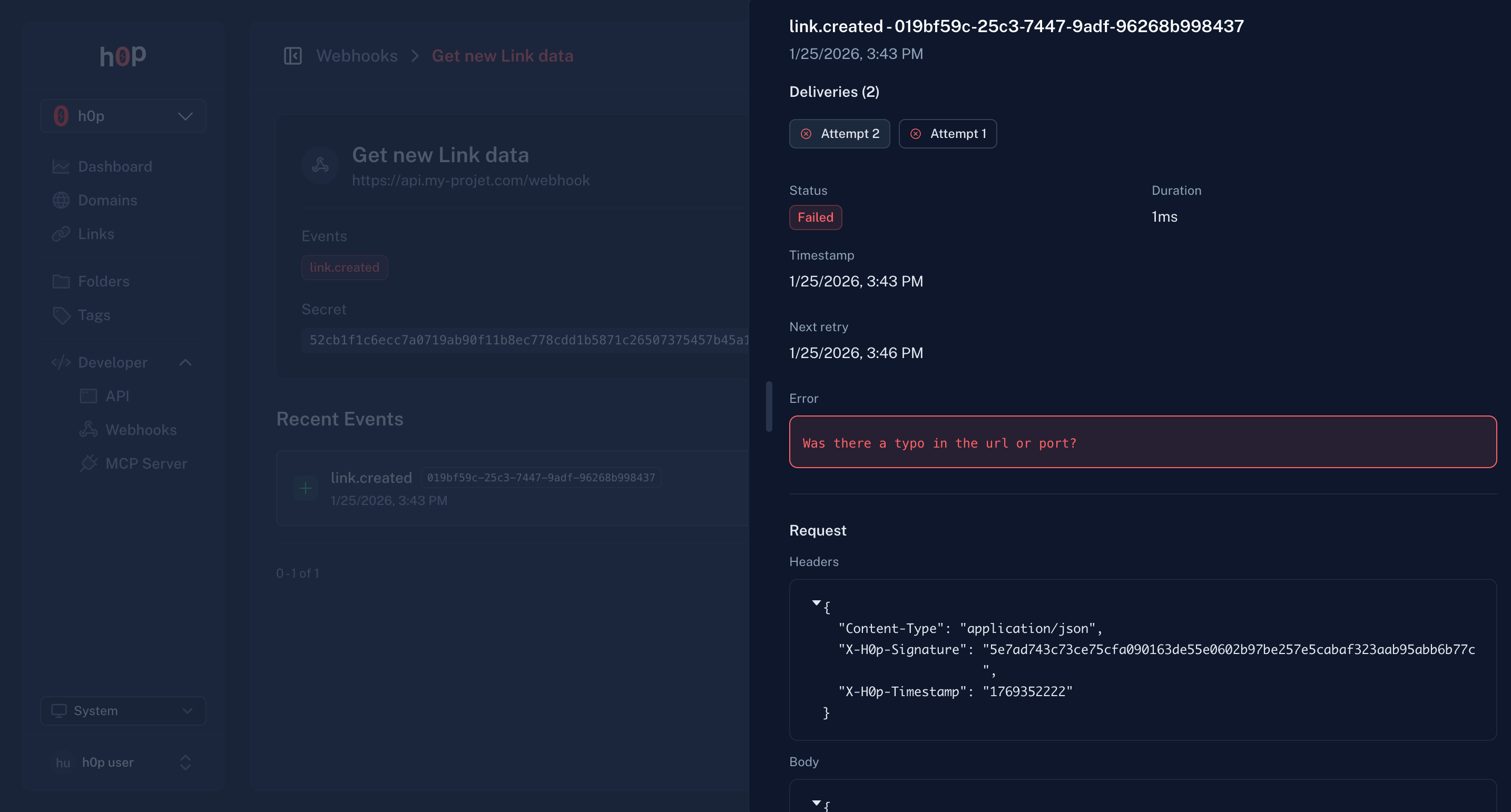
View recent webhook deliveries in the webhook details page:
* **Event type** - Which event triggered the delivery
* **Status** - Success or failure
* **Response code** - HTTP status returned by your server
* **Timestamp** - When the delivery was attempted
 ### Re-enable disabled webhooks
If a webhook is disabled due to failures:
1. Fix the issue with your endpoint
2. Go to the webhook settings
3. Toggle the webhook back on
4. The failure counter resets
## Best practices
Return a 2xx response as quickly as possible. Process events asynchronously in a queue.
```javascript theme={null}
app.post('/webhook', async (req, res) => {
// Acknowledge immediately
res.status(200).send('OK');
// Process async
await queue.add('process-webhook', req.body);
});
```
Network issues can cause duplicate deliveries. Use the event `id` to deduplicate:
```javascript theme={null}
if (await hasProcessedEvent(event.id)) {
return; // Already processed
}
```
Only process events you expect. Ignore unknown event types gracefully:
```javascript theme={null}
switch (event.type) {
case 'link.created':
await handleLinkCreated(event);
break;
case 'link.clicked':
await handleLinkClicked(event);
break;
default:
console.log(`Unknown event type: ${event.type}`);
}
```
Always use HTTPS endpoints. HTTP is not supported and exposes your data.
Use environment variables or a secrets manager. Never commit secrets to version control.
## Testing webhooks
### Local development
Use a tunneling service to expose your local server:
```bash theme={null}
# Install ngrok
brew install ngrok
# Start your local server
npm run dev
# Expose it
ngrok http 3000
```
Use the ngrok URL (e.g., `https://abc123.ngrok.io/webhook`) as your webhook endpoint.
```bash theme={null}
# Install cloudflared
brew install cloudflared
# Start tunnel
cloudflared tunnel --url http://localhost:3000
```
### Webhook testing tools
1. Create a webhook with a test endpoint
2. Trigger an event (create a link)
3. Check the delivery history for the request/response
## Limits
| Limit | Value |
| ------------------------- | ---------- |
| Webhooks per organization | 50 |
| Concurrent deliveries | 10 |
| Request timeout | 30 seconds |
| Max retries | 6 |
## API access
Manage webhooks programmatically:
```bash theme={null}
# Create webhook
curl -X POST https://api.h0p.co/webhook \
-H "x-api-key: YOUR_API_KEY" \
-H "Content-Type: application/json" \
-d '{
"url": "https://your-server.com/webhook",
"events": ["link.created", "link.clicked"]
}'
# List webhooks
curl https://api.h0p.co/webhook/list \
-H "x-api-key: YOUR_API_KEY"
```
See the [API Reference](/api-reference/introduction) for complete documentation.
### Re-enable disabled webhooks
If a webhook is disabled due to failures:
1. Fix the issue with your endpoint
2. Go to the webhook settings
3. Toggle the webhook back on
4. The failure counter resets
## Best practices
Return a 2xx response as quickly as possible. Process events asynchronously in a queue.
```javascript theme={null}
app.post('/webhook', async (req, res) => {
// Acknowledge immediately
res.status(200).send('OK');
// Process async
await queue.add('process-webhook', req.body);
});
```
Network issues can cause duplicate deliveries. Use the event `id` to deduplicate:
```javascript theme={null}
if (await hasProcessedEvent(event.id)) {
return; // Already processed
}
```
Only process events you expect. Ignore unknown event types gracefully:
```javascript theme={null}
switch (event.type) {
case 'link.created':
await handleLinkCreated(event);
break;
case 'link.clicked':
await handleLinkClicked(event);
break;
default:
console.log(`Unknown event type: ${event.type}`);
}
```
Always use HTTPS endpoints. HTTP is not supported and exposes your data.
Use environment variables or a secrets manager. Never commit secrets to version control.
## Testing webhooks
### Local development
Use a tunneling service to expose your local server:
```bash theme={null}
# Install ngrok
brew install ngrok
# Start your local server
npm run dev
# Expose it
ngrok http 3000
```
Use the ngrok URL (e.g., `https://abc123.ngrok.io/webhook`) as your webhook endpoint.
```bash theme={null}
# Install cloudflared
brew install cloudflared
# Start tunnel
cloudflared tunnel --url http://localhost:3000
```
### Webhook testing tools
1. Create a webhook with a test endpoint
2. Trigger an event (create a link)
3. Check the delivery history for the request/response
## Limits
| Limit | Value |
| ------------------------- | ---------- |
| Webhooks per organization | 50 |
| Concurrent deliveries | 10 |
| Request timeout | 30 seconds |
| Max retries | 6 |
## API access
Manage webhooks programmatically:
```bash theme={null}
# Create webhook
curl -X POST https://api.h0p.co/webhook \
-H "x-api-key: YOUR_API_KEY" \
-H "Content-Type: application/json" \
-d '{
"url": "https://your-server.com/webhook",
"events": ["link.created", "link.clicked"]
}'
# List webhooks
curl https://api.h0p.co/webhook/list \
-H "x-api-key: YOUR_API_KEY"
```
See the [API Reference](/api-reference/introduction) for complete documentation.