> ## Documentation Index
> Fetch the complete documentation index at: https://docs.h0p.co/llms.txt
> Use this file to discover all available pages before exploring further.
# Short Links
> Create, customize, and track powerful short links
Short links are the core of H0p. Transform long URLs into memorable, trackable links with advanced features like custom slugs, analytics, QR codes, and smart routing.
## Creating a short link
Every short link has a destination (where it redirects to) and a slug (the unique identifier).
Navigate to **Links** in the sidebar and click **Create Link**.
Select which domain to use for your link. You can use `h0p.co` or any [custom domain](/platform/domains) you've configured.
Enter the URL, email address, or phone number you want the link to redirect to.
**Supported destination types:**
* **URL** - Standard web addresses (`https://example.com`)
* **Email** - Opens mail client (`mailto:hello@example.com`)
* **Phone** - Opens phone dialer (`tel:+1234567890`)
Choose a custom slug or let H0p generate a random 6-character one.
Good slugs are short, memorable, and relevant. Use `h0p.co/promo` instead of `h0p.co/winter-2024-promotional-campaign-landing-page`.
Click **Create** to save. Your link is immediately active.
 ## Link settings
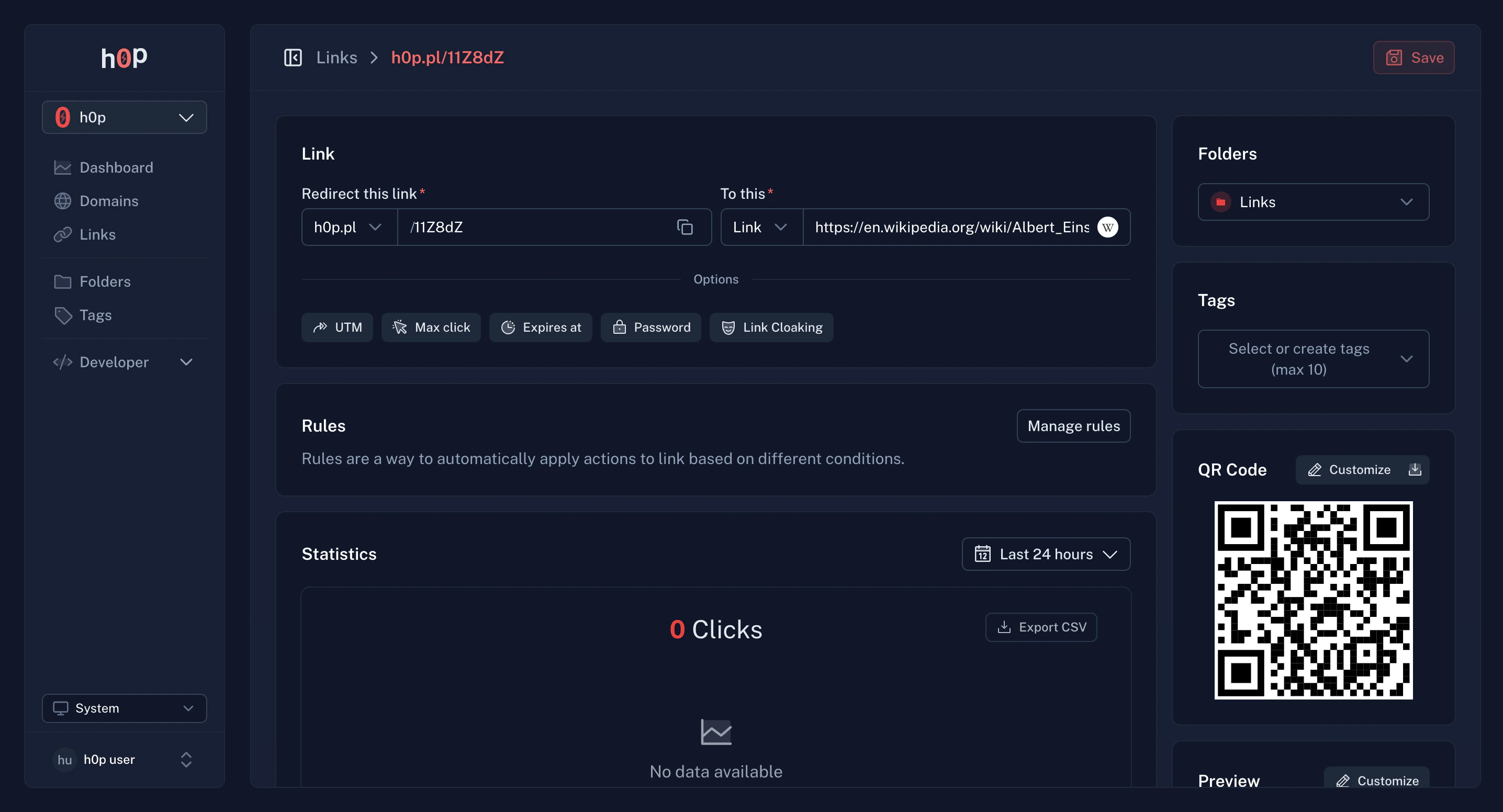
### Basic settings
Every link has these core settings:
| Setting | Description |
| --------------- | --------------------------------------- |
| **Destination** | Where the link redirects to |
| **Slug** | The unique path after your domain |
| **Domain** | Which domain hosts this link |
| **Folder** | Organization folder (Premium) |
| **Tags** | Labels for filtering and categorization |
### UTM parameters
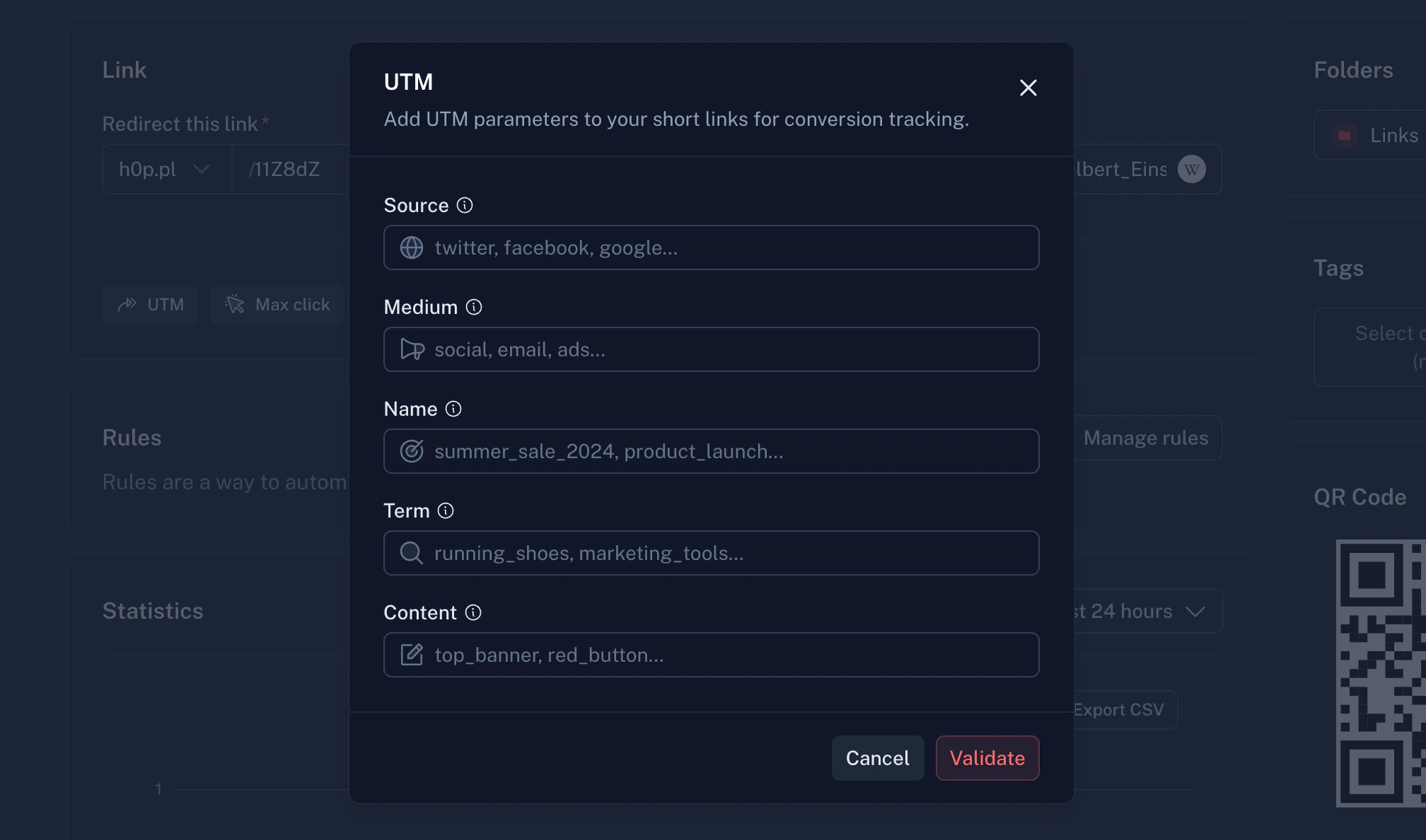
Add UTM parameters to track campaign performance:
| Parameter | Description | Example |
| -------------- | ---------------- | ------------------------ |
| `utm_source` | Traffic source | `newsletter`, `twitter` |
| `utm_medium` | Marketing medium | `email`, `social`, `cpc` |
| `utm_campaign` | Campaign name | `spring_sale` |
| `utm_term` | Paid keywords | `running_shoes` |
| `utm_content` | Content variant | `header_link` |
UTM parameters are automatically appended to your destination URL. H0p tracks these in analytics.
## Link settings
### Basic settings
Every link has these core settings:
| Setting | Description |
| --------------- | --------------------------------------- |
| **Destination** | Where the link redirects to |
| **Slug** | The unique path after your domain |
| **Domain** | Which domain hosts this link |
| **Folder** | Organization folder (Premium) |
| **Tags** | Labels for filtering and categorization |
### UTM parameters
Add UTM parameters to track campaign performance:
| Parameter | Description | Example |
| -------------- | ---------------- | ------------------------ |
| `utm_source` | Traffic source | `newsletter`, `twitter` |
| `utm_medium` | Marketing medium | `email`, `social`, `cpc` |
| `utm_campaign` | Campaign name | `spring_sale` |
| `utm_term` | Paid keywords | `running_shoes` |
| `utm_content` | Content variant | `header_link` |
UTM parameters are automatically appended to your destination URL. H0p tracks these in analytics.
 ## Premium features
The following features require a Premium subscription.
### Password protection
Restrict access to your links with a password:
In the link settings, toggle on **Password Protection**.
Enter a password between 5 and 25 characters.
Share the password separately from the link for security.
When someone visits a password-protected link, they'll see a form to enter the password before being redirected.
### Expiration settings
Control when and how links become inactive:
Set a specific date and time when the link expires:
* Link works normally until the expiration date
* After expiration, visitors see an error page
* You can extend or remove expiration at any time
Set a maximum number of clicks:
* Link works until the limit is reached
* After the limit, visitors see an error page
* View remaining clicks in the link details
Perfect for limited offers or exclusive content.
### Cloaking
Display your destination in an iframe instead of redirecting:
* Original URL stays in the browser address bar
* Content from destination loads in the page
* Useful for affiliate links or white-labeling
Some websites block iframe embedding. Test your destination before relying on cloaking.
### Custom meta tags
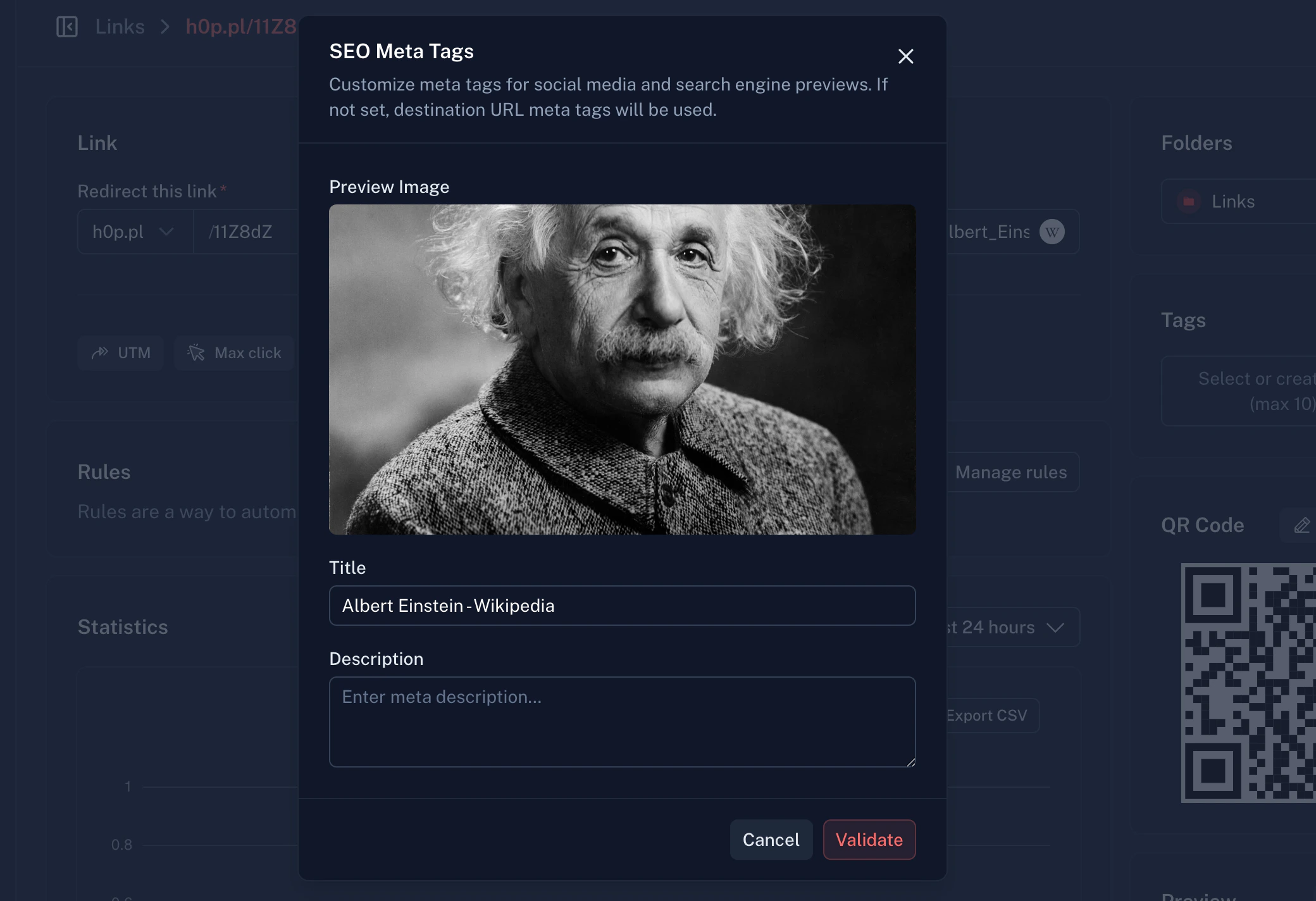
Control how your links appear when shared on social media:
| Field | Description | Character limit |
| --------------- | -------------------------------------- | --------------- |
| **Title** | The headline shown in previews | 200 characters |
| **Description** | Supporting text below the title | 500 characters |
| **Image** | Preview image (1200x630px recommended) | 1MB max |
## Premium features
The following features require a Premium subscription.
### Password protection
Restrict access to your links with a password:
In the link settings, toggle on **Password Protection**.
Enter a password between 5 and 25 characters.
Share the password separately from the link for security.
When someone visits a password-protected link, they'll see a form to enter the password before being redirected.
### Expiration settings
Control when and how links become inactive:
Set a specific date and time when the link expires:
* Link works normally until the expiration date
* After expiration, visitors see an error page
* You can extend or remove expiration at any time
Set a maximum number of clicks:
* Link works until the limit is reached
* After the limit, visitors see an error page
* View remaining clicks in the link details
Perfect for limited offers or exclusive content.
### Cloaking
Display your destination in an iframe instead of redirecting:
* Original URL stays in the browser address bar
* Content from destination loads in the page
* Useful for affiliate links or white-labeling
Some websites block iframe embedding. Test your destination before relying on cloaking.
### Custom meta tags
Control how your links appear when shared on social media:
| Field | Description | Character limit |
| --------------- | -------------------------------------- | --------------- |
| **Title** | The headline shown in previews | 200 characters |
| **Description** | Supporting text below the title | 500 characters |
| **Image** | Preview image (1200x630px recommended) | 1MB max |
 ### Smart routing rules
Route visitors to different destinations based on their characteristics:
Send visitors to different URLs based on their country:
* Show localized content (`/en` vs `/fr` vs `/de`)
* Region-specific pricing pages
* Comply with regional regulations
Uses ISO 3166-1 alpha-2 country codes (US, GB, FR, etc.)
Different destinations for different operating systems:
* **iOS** - App Store link
* **Android** - Play Store link
* **Desktop** - Website
Supported: Windows, macOS, Linux, iOS, Android
Route based on browser language preferences:
* Match content to user's preferred language
* Improve user experience without redirects
* Uses ISO 639-1 language codes (en, fr, es, etc.)
**How rules work:**
1. Rules are evaluated in priority order (0 = highest)
2. First matching rule determines the destination
3. If no rules match, the default destination is used
```json theme={null}
{
"rules": [
{
"priority": 0,
"destination": "https://example.com/ios",
"osTypes": ["ios"]
},
{
"priority": 1,
"destination": "https://example.com/android",
"osTypes": ["android"]
}
]
}
```
### Deep linking
Send mobile users directly into your app:
| Platform | Field | Example |
| -------- | ----------------- | --------------------- |
| iOS | `iosDeepLink` | `myapp://product/123` |
| Android | `androidDeepLink` | `myapp://product/123` |
Configure [Apple App Site Association and Android Asset Links](/platform/domains#deep-linking) on your domain for Universal Links support.
### Automatic deep linking
When your destination URL points to a supported app, H0p automatically generates deep links to redirect mobile users directly into the native app instead of the website.
**How it works:**
1. You create a link to a supported platform (e.g., `https://open.spotify.com/track/...`)
2. H0p detects the platform and extracts the content ID
3. When a mobile user clicks, they're redirected to the native app
4. Desktop users are redirected to the website as normal
**Supported platforms:**
We will add a lot of apps in the future, keep updated !
* Spotify
* Apple Music
* YouTube
* Twitch
* Instagram
* TikTok
* Facebook
* X (Twitter)
* LinkedIn
* WhatsApp
* Telegram
* Amazon
* Pinterest
* Reddit
* Discord
Automatic deep linking works out of the box. No configuration required - just paste your destination URL and H0p handles the rest.
## QR codes
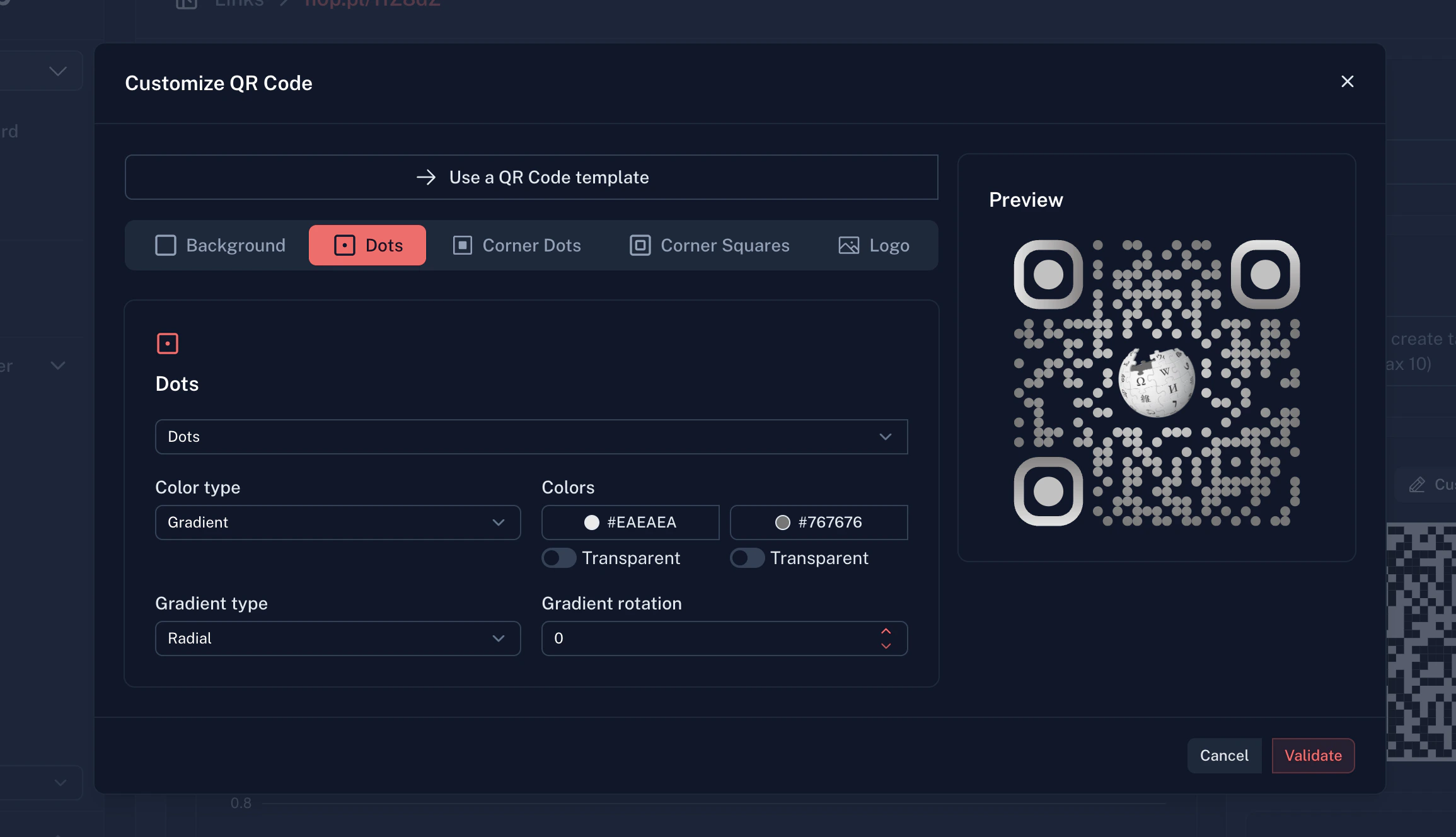
Every link includes an auto-generated QR code. Premium users can customize:
### Basic QR code
* Available to all users
* Standard black and white design
* PNG download
### Customized QR code (Premium)
Custom colors for dots, background, and corners. Gradient support with linear or radial options.
Different dot styles: square, rounded, dots, classy, classy-rounded, extra-rounded.
Add your brand logo in the center. Supports PNG, JPEG, WebP, SVG (max 500KB).
Customize corner squares and dots with different shapes and colors.
### Smart routing rules
Route visitors to different destinations based on their characteristics:
Send visitors to different URLs based on their country:
* Show localized content (`/en` vs `/fr` vs `/de`)
* Region-specific pricing pages
* Comply with regional regulations
Uses ISO 3166-1 alpha-2 country codes (US, GB, FR, etc.)
Different destinations for different operating systems:
* **iOS** - App Store link
* **Android** - Play Store link
* **Desktop** - Website
Supported: Windows, macOS, Linux, iOS, Android
Route based on browser language preferences:
* Match content to user's preferred language
* Improve user experience without redirects
* Uses ISO 639-1 language codes (en, fr, es, etc.)
**How rules work:**
1. Rules are evaluated in priority order (0 = highest)
2. First matching rule determines the destination
3. If no rules match, the default destination is used
```json theme={null}
{
"rules": [
{
"priority": 0,
"destination": "https://example.com/ios",
"osTypes": ["ios"]
},
{
"priority": 1,
"destination": "https://example.com/android",
"osTypes": ["android"]
}
]
}
```
### Deep linking
Send mobile users directly into your app:
| Platform | Field | Example |
| -------- | ----------------- | --------------------- |
| iOS | `iosDeepLink` | `myapp://product/123` |
| Android | `androidDeepLink` | `myapp://product/123` |
Configure [Apple App Site Association and Android Asset Links](/platform/domains#deep-linking) on your domain for Universal Links support.
### Automatic deep linking
When your destination URL points to a supported app, H0p automatically generates deep links to redirect mobile users directly into the native app instead of the website.
**How it works:**
1. You create a link to a supported platform (e.g., `https://open.spotify.com/track/...`)
2. H0p detects the platform and extracts the content ID
3. When a mobile user clicks, they're redirected to the native app
4. Desktop users are redirected to the website as normal
**Supported platforms:**
We will add a lot of apps in the future, keep updated !
* Spotify
* Apple Music
* YouTube
* Twitch
* Instagram
* TikTok
* Facebook
* X (Twitter)
* LinkedIn
* WhatsApp
* Telegram
* Amazon
* Pinterest
* Reddit
* Discord
Automatic deep linking works out of the box. No configuration required - just paste your destination URL and H0p handles the rest.
## QR codes
Every link includes an auto-generated QR code. Premium users can customize:
### Basic QR code
* Available to all users
* Standard black and white design
* PNG download
### Customized QR code (Premium)
Custom colors for dots, background, and corners. Gradient support with linear or radial options.
Different dot styles: square, rounded, dots, classy, classy-rounded, extra-rounded.
Add your brand logo in the center. Supports PNG, JPEG, WebP, SVG (max 500KB).
Customize corner squares and dots with different shapes and colors.
 ## Analytics
H0p tracks comprehensive analytics for every click:
### Available metrics
| Metric | Description |
| --------------------- | ---------------------------------- |
| **Total clicks** | All-time click count |
| **Unique visitors** | Deduplicated by visitor hash |
| **Countries** | Geographic distribution |
| **Cities** | City-level location data |
| **Devices** | Mobile vs desktop breakdown |
| **Browsers** | Chrome, Safari, Firefox, etc. |
| **Operating systems** | Windows, macOS, iOS, Android, etc. |
| **Referrers** | Where traffic comes from |
| **UTM data** | Campaign tracking breakdown |
| **QR vs direct** | QR code scans vs direct clicks |
### Data retention
| Plan | Retention |
| ------- | --------- |
| Free | 30 days |
| Premium | 2 years |
### Viewing analytics
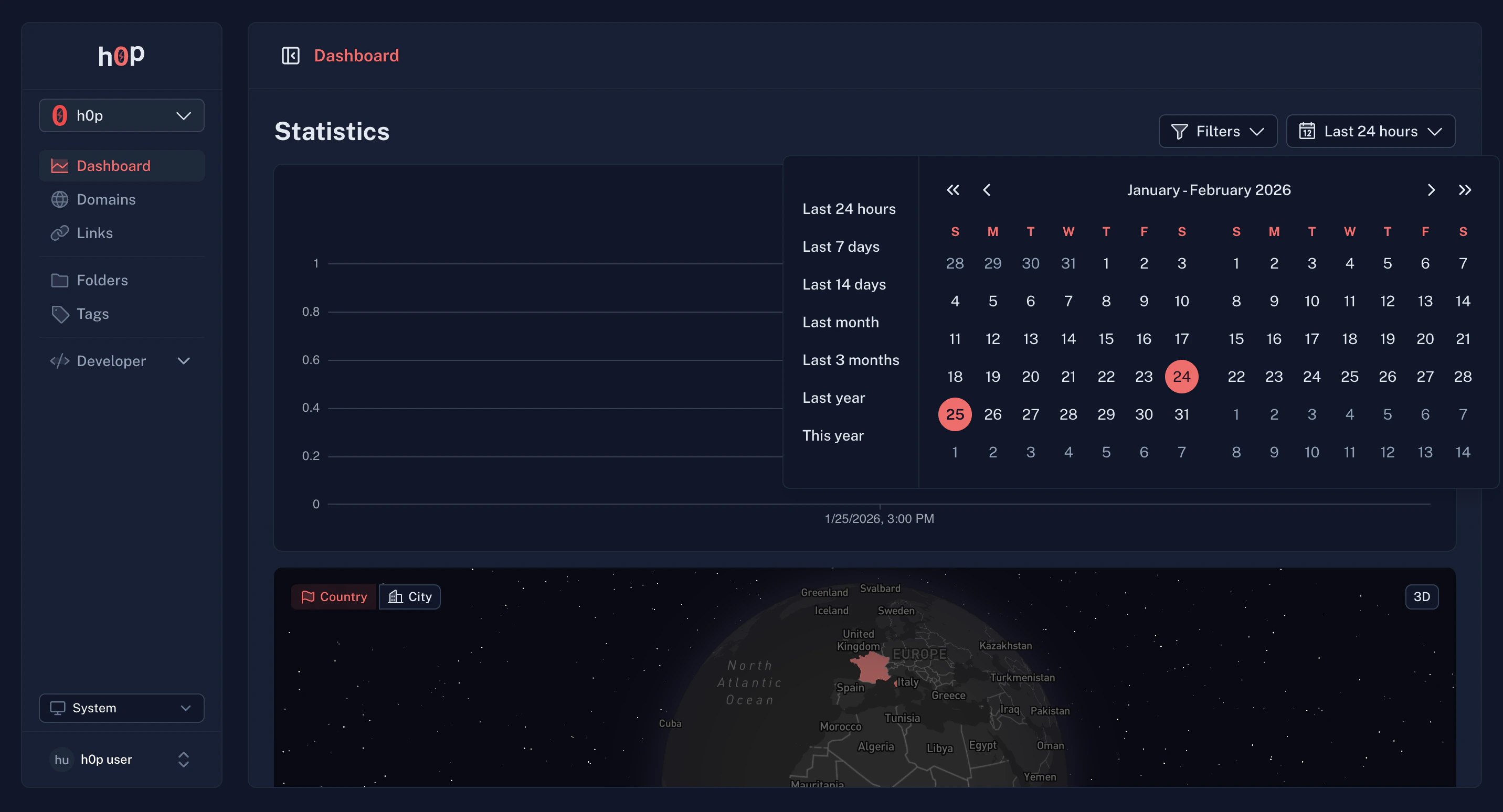
The main dashboard shows aggregate analytics across all links.
Use filters to view analytics for specific links, domains, folders, or tags.
Select your preferred time period using the date range picker.
## Analytics
H0p tracks comprehensive analytics for every click:
### Available metrics
| Metric | Description |
| --------------------- | ---------------------------------- |
| **Total clicks** | All-time click count |
| **Unique visitors** | Deduplicated by visitor hash |
| **Countries** | Geographic distribution |
| **Cities** | City-level location data |
| **Devices** | Mobile vs desktop breakdown |
| **Browsers** | Chrome, Safari, Firefox, etc. |
| **Operating systems** | Windows, macOS, iOS, Android, etc. |
| **Referrers** | Where traffic comes from |
| **UTM data** | Campaign tracking breakdown |
| **QR vs direct** | QR code scans vs direct clicks |
### Data retention
| Plan | Retention |
| ------- | --------- |
| Free | 30 days |
| Premium | 2 years |
### Viewing analytics
The main dashboard shows aggregate analytics across all links.
Use filters to view analytics for specific links, domains, folders, or tags.
Select your preferred time period using the date range picker.
 ## Organization with folders and tags
### Folders (Premium)
Group related links into folders:
* **Marketing** - Campaign links
* **Product** - Product page links
* **Support** - Help center links
Each organization gets one default folder. Premium users can create up to 100 folders.
### Tags
Add labels to links for flexible categorization:
* A link can have multiple tags
* Filter your link list by tags
* Custom colors for visual organization
Free users get 3 tags. Premium users get up to 100.
## Best practices
Use short, descriptive slugs that hint at the content. `h0p.co/pricing` is better than `h0p.co/p1x2y3`.
Establish naming conventions for your team:
* Campaigns: `campaign-name-channel` (e.g., `spring-sale-email`)
* Products: `product-feature` (e.g., `api-docs`)
Set up folders and tags before creating many links. Retroactive organization is tedious.
Click your link before sharing it widely. Verify the destination, analytics tracking, and any routing rules.
Check analytics regularly to understand what's working. Use the data to optimize your campaigns.
## API access
Create and manage links programmatically with the H0p API:
```bash theme={null}
curl -X POST https://api.h0p.co/short-link \
-H "x-api-key: YOUR_API_KEY" \
-H "Content-Type: application/json" \
-d '{
"destination": {
"type": "link",
"value": "https://example.com"
},
"slug": "my-link",
"domainId": "your-domain-id"
}'
```
See the [API Reference](/api-reference/introduction) for complete documentation.
## Organization with folders and tags
### Folders (Premium)
Group related links into folders:
* **Marketing** - Campaign links
* **Product** - Product page links
* **Support** - Help center links
Each organization gets one default folder. Premium users can create up to 100 folders.
### Tags
Add labels to links for flexible categorization:
* A link can have multiple tags
* Filter your link list by tags
* Custom colors for visual organization
Free users get 3 tags. Premium users get up to 100.
## Best practices
Use short, descriptive slugs that hint at the content. `h0p.co/pricing` is better than `h0p.co/p1x2y3`.
Establish naming conventions for your team:
* Campaigns: `campaign-name-channel` (e.g., `spring-sale-email`)
* Products: `product-feature` (e.g., `api-docs`)
Set up folders and tags before creating many links. Retroactive organization is tedious.
Click your link before sharing it widely. Verify the destination, analytics tracking, and any routing rules.
Check analytics regularly to understand what's working. Use the data to optimize your campaigns.
## API access
Create and manage links programmatically with the H0p API:
```bash theme={null}
curl -X POST https://api.h0p.co/short-link \
-H "x-api-key: YOUR_API_KEY" \
-H "Content-Type: application/json" \
-d '{
"destination": {
"type": "link",
"value": "https://example.com"
},
"slug": "my-link",
"domainId": "your-domain-id"
}'
```
See the [API Reference](/api-reference/introduction) for complete documentation.