> ## Documentation Index
> Fetch the complete documentation index at: https://docs.h0p.co/llms.txt
> Use this file to discover all available pages before exploring further.
# Quickstart
> Make your first API call in minutes
This guide walks you through making your first H0p API calls. You'll create an API key, list your domains, create a short link, and retrieve analytics.
## Prerequisites
Before you begin, make sure you have:
* A H0p account ([sign up here](https://dashboard.h0p.co/signup))
* A Premium subscription (required for API access)
* A tool to make HTTP requests (cURL, Postman, or your favorite HTTP client)
## Step 1: Create your API key
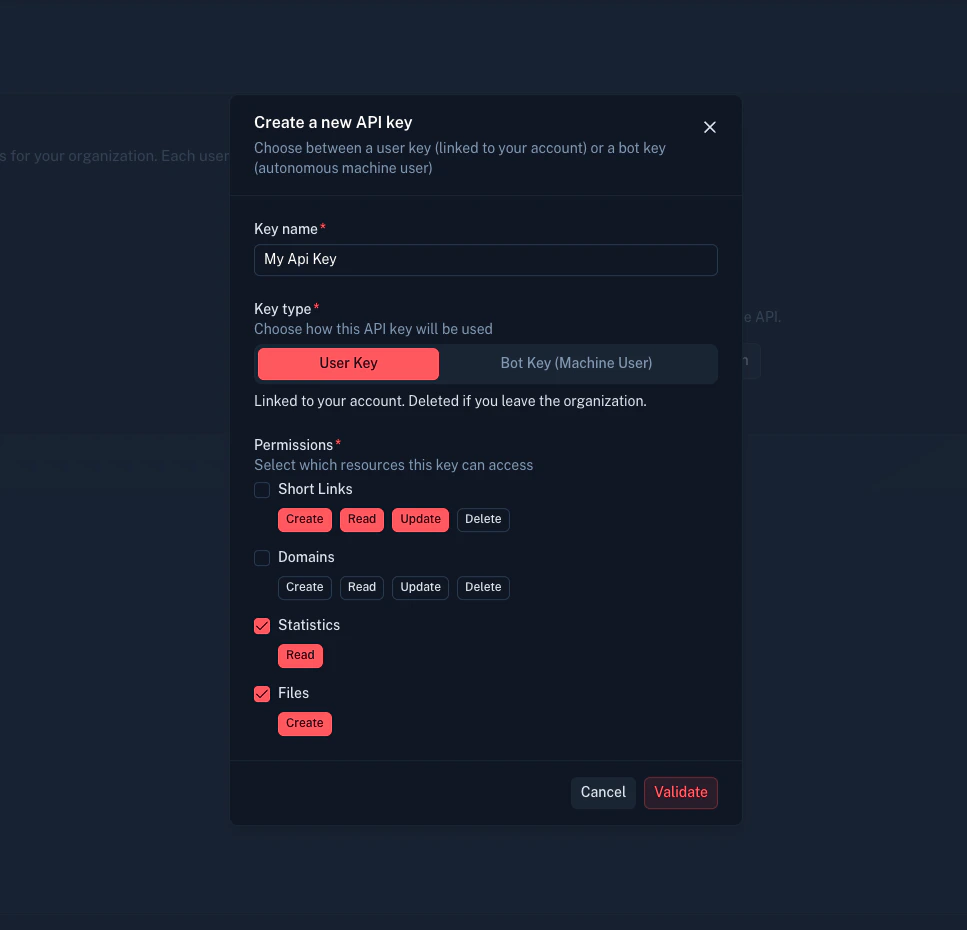
API keys are managed in the H0p dashboard under Developer Tools.
Go to **Developer Tools** > **API Keys** in the sidebar.
Click **Create API Key** and choose a key type:
* **User key** - Linked to your account, for personal use
* **Bot key** - Autonomous machine user, for production systems
Select the permissions your key needs:
| Resource | Actions |
| ----------- | ---------------------------- |
| Short links | create, read, update, delete |
| Domains | create, read, update, delete |
| Stats | read |
| Files | create, read |
Follow the principle of least privilege. Only grant permissions your integration needs.
 Your API key is shown only once. Copy it and store it securely (e.g., in environment variables or a secrets manager).
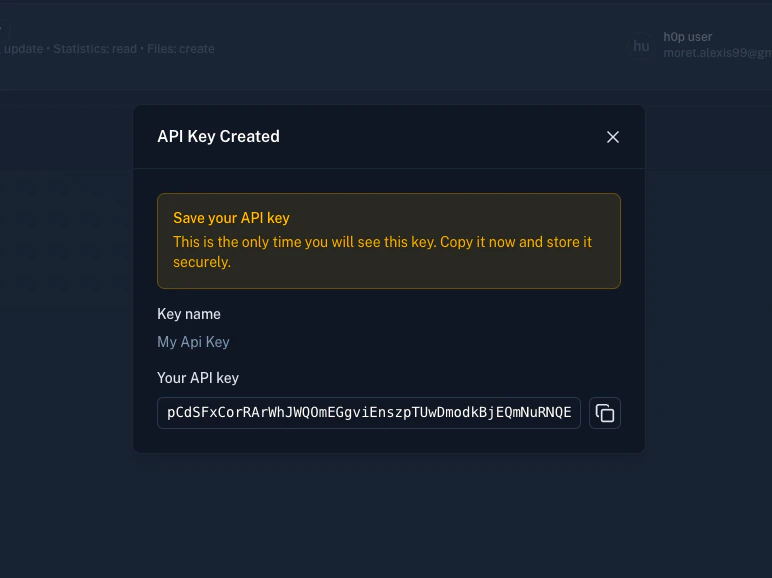 Your API key is shown only once. If you lose it, you'll need to create a new one.
## Step 2: List your domains
Let's verify your API key works by listing your available domains:
```bash theme={null}
curl -X GET "https://api.h0p.co/domain/list?page=0&limit=10" \
-H "x-api-key: YOUR_API_KEY"
```
**Response:**
```json theme={null}
{
"items": [
{
"id": "550e8400-e29b-41d4-a716-446655440000",
"domain": "h0p.co",
"isVerified": true,
"isPrimary": true,
"createdAt": "2024-01-01T00:00:00.000Z"
}
],
"pagination": {
"page": 0,
"limit": 10,
"totalItems": 1,
"totalPages": 1
}
}
```
If you see a response like this, your API key is working. Note the `id` of the domain you want to use for creating links.
## Step 3: Create your first short link
Now create a short link. The request requires a `destination` object and optionally a custom `slug`:
```bash theme={null}
curl -X POST "https://api.h0p.co/short-link" \
-H "x-api-key: YOUR_API_KEY" \
-H "Content-Type: application/json" \
-d '{
"destination": {
"type": "link",
"value": "https://example.com/my-landing-page"
},
"slug": "my-first-link",
"domainId": "550e8400-e29b-41d4-a716-446655440000"
}'
```
**Request body fields:**
| Field | Type | Required | Description |
| ------------------- | ------ | -------- | --------------------------------------- |
| `destination.type` | string | Yes | `link`, `mail`, or `phone` |
| `destination.value` | string | Yes | The target URL, email, or phone |
| `slug` | string | No | Custom slug (auto-generated if omitted) |
| `domainId` | string | No | Domain UUID (uses primary if omitted) |
**Response:**
```json theme={null}
{
"id": "660e8400-e29b-41d4-a716-446655440001",
"slug": "my-first-link",
"shortUrl": "https://h0p.co/my-first-link",
"destination": {
"id": "770e8400-e29b-41d4-a716-446655440002",
"type": "link",
"value": "https://example.com/my-landing-page"
},
"domain": {
"id": "550e8400-e29b-41d4-a716-446655440000",
"domain": "h0p.co"
},
"clicks": 0,
"createdAt": "2024-01-15T10:30:00.000Z"
}
```
Your short link is now live at `https://h0p.co/my-first-link`.
## Step 4: Create a link with advanced options
Create a link with UTM parameters, tags, and other options:
```bash theme={null}
curl -X POST "https://api.h0p.co/short-link" \
-H "x-api-key: YOUR_API_KEY" \
-H "Content-Type: application/json" \
-d '{
"destination": {
"type": "link",
"value": "https://example.com/product"
},
"slug": "spring-sale",
"domainId": "550e8400-e29b-41d4-a716-446655440000",
"tags": ["marketing", "spring-2024"],
"utmSource": "email",
"utmMedium": "newsletter",
"utmCampaign": "spring_sale"
}'
```
UTM parameters are automatically appended to the destination URL when visitors click the link.
## Step 5: Get link analytics
Retrieve click statistics using the stats endpoint:
```bash theme={null}
curl -X GET "https://api.h0p.co/stats/overview?startDate=2024-01-01T00:00:00Z&endDate=2024-01-31T23:59:59Z&groupBy=country&shortLinkIds=660e8400-e29b-41d4-a716-446655440001" \
-H "x-api-key: YOUR_API_KEY"
```
**Query parameters:**
| Parameter | Type | Required | Description |
| -------------- | -------- | -------- | --------------------------- |
| `startDate` | ISO date | Yes | Start of date range |
| `endDate` | ISO date | Yes | End of date range |
| `groupBy` | string | Yes | Dimension to group by |
| `shortLinkIds` | string | No | Filter by specific link IDs |
**Available `groupBy` values:**
* `country`, `city`, `region`, `continent`
* `device`, `browser`, `os`
* `referer`, `utmSource`, `utmMedium`, `utmCampaign`
* `shortLinks`, `uniqueVisitors`
**Response:**
```json theme={null}
{
"data": [
{ "country": "US", "clicks": 150 },
{ "country": "GB", "clicks": 45 },
{ "country": "FR", "clicks": 32 },
{ "country": "DE", "clicks": 28 }
],
"totalClicks": 255
}
```
### Get clicks over time
For time-series data:
```bash theme={null}
curl -X GET "https://api.h0p.co/stats/clicks-over-time?startDate=2024-01-01T00:00:00Z&endDate=2024-01-31T23:59:59Z" \
-H "x-api-key: YOUR_API_KEY"
```
**Response:**
```json theme={null}
{
"data": [
{ "date": "2024-01-01", "clicks": 12 },
{ "date": "2024-01-02", "clicks": 18 },
{ "date": "2024-01-03", "clicks": 25 }
]
}
```
## Step 6: Update a link
Modify an existing link's destination or settings:
```bash theme={null}
curl -X PATCH "https://api.h0p.co/short-link/660e8400-e29b-41d4-a716-446655440001" \
-H "x-api-key: YOUR_API_KEY" \
-H "Content-Type: application/json" \
-d '{
"destination": {
"type": "link",
"value": "https://example.com/new-landing-page"
}
}'
```
## Step 7: Delete a link
Remove a link when it's no longer needed:
```bash theme={null}
curl -X DELETE "https://api.h0p.co/short-link/660e8400-e29b-41d4-a716-446655440001" \
-H "x-api-key: YOUR_API_KEY"
```
**Response:** `204 No Content` on success.
## Next steps
Learn about API key types, permissions, and security best practices.
Explore advanced link features like routing rules, password protection, and expiration.
Add custom domains and configure deep linking.
Set up real-time notifications for link events.
## Code examples
```javascript theme={null}
const API_KEY = process.env.H0P_API_KEY;
const BASE_URL = 'https://api.h0p.co';
async function createShortLink(destination, slug) {
const response = await fetch(`${BASE_URL}/short-link`, {
method: 'POST',
headers: {
'x-api-key': API_KEY,
'Content-Type': 'application/json'
},
body: JSON.stringify({
destination: {
type: 'link',
value: destination
},
slug
})
});
if (!response.ok) {
const error = await response.json();
throw new Error(error.error?.message || 'Failed to create link');
}
return response.json();
}
// Usage
const link = await createShortLink('https://example.com', 'my-link');
console.log(link.shortUrl); // https://h0p.co/my-link
```
```python theme={null}
import os
import requests
API_KEY = os.environ['H0P_API_KEY']
BASE_URL = 'https://api.h0p.co'
def create_short_link(destination: str, slug: str = None) -> dict:
response = requests.post(
f'{BASE_URL}/short-link',
headers={
'x-api-key': API_KEY,
'Content-Type': 'application/json'
},
json={
'destination': {
'type': 'link',
'value': destination
},
'slug': slug
}
)
response.raise_for_status()
return response.json()
# Usage
link = create_short_link('https://example.com', 'my-link')
print(link['shortUrl']) # https://h0p.co/my-link
```
```go theme={null}
package main
import (
"bytes"
"encoding/json"
"net/http"
"os"
)
const baseURL = "https://api.h0p.co"
type Destination struct {
Type string `json:"type"`
Value string `json:"value"`
}
type CreateLinkRequest struct {
Destination Destination `json:"destination"`
Slug string `json:"slug,omitempty"`
}
func createShortLink(destination, slug string) (map[string]interface{}, error) {
apiKey := os.Getenv("H0P_API_KEY")
body, _ := json.Marshal(CreateLinkRequest{
Destination: Destination{Type: "link", Value: destination},
Slug: slug,
})
req, _ := http.NewRequest("POST", baseURL+"/short-link", bytes.NewBuffer(body))
req.Header.Set("x-api-key", apiKey)
req.Header.Set("Content-Type", "application/json")
client := &http.Client{}
resp, err := client.Do(req)
if err != nil {
return nil, err
}
defer resp.Body.Close()
var result map[string]interface{}
json.NewDecoder(resp.Body).Decode(&result)
return result, nil
}
```
## Troubleshooting
**Possible causes:**
* Missing `x-api-key` header
* Typo in the API key
* Key has been revoked
* Using wrong header name (use `x-api-key`, not `Authorization`)
**Solution:** Verify your API key in the dashboard and ensure it's being sent correctly.
**Possible causes:**
* API key doesn't have required permissions
* Trying to access resources from another organization
* Premium feature on Free plan
**Solution:** Check your key permissions in the dashboard or upgrade your plan.
**Possible causes:**
* Slug already exists
**Solution:** Use a different slug or omit it to auto-generate one.
**Solution:** Implement exponential backoff and wait before retrying.
Still stuck? Contact us at [contact@h0p.co](mailto:contact@h0p.co).
Your API key is shown only once. If you lose it, you'll need to create a new one.
## Step 2: List your domains
Let's verify your API key works by listing your available domains:
```bash theme={null}
curl -X GET "https://api.h0p.co/domain/list?page=0&limit=10" \
-H "x-api-key: YOUR_API_KEY"
```
**Response:**
```json theme={null}
{
"items": [
{
"id": "550e8400-e29b-41d4-a716-446655440000",
"domain": "h0p.co",
"isVerified": true,
"isPrimary": true,
"createdAt": "2024-01-01T00:00:00.000Z"
}
],
"pagination": {
"page": 0,
"limit": 10,
"totalItems": 1,
"totalPages": 1
}
}
```
If you see a response like this, your API key is working. Note the `id` of the domain you want to use for creating links.
## Step 3: Create your first short link
Now create a short link. The request requires a `destination` object and optionally a custom `slug`:
```bash theme={null}
curl -X POST "https://api.h0p.co/short-link" \
-H "x-api-key: YOUR_API_KEY" \
-H "Content-Type: application/json" \
-d '{
"destination": {
"type": "link",
"value": "https://example.com/my-landing-page"
},
"slug": "my-first-link",
"domainId": "550e8400-e29b-41d4-a716-446655440000"
}'
```
**Request body fields:**
| Field | Type | Required | Description |
| ------------------- | ------ | -------- | --------------------------------------- |
| `destination.type` | string | Yes | `link`, `mail`, or `phone` |
| `destination.value` | string | Yes | The target URL, email, or phone |
| `slug` | string | No | Custom slug (auto-generated if omitted) |
| `domainId` | string | No | Domain UUID (uses primary if omitted) |
**Response:**
```json theme={null}
{
"id": "660e8400-e29b-41d4-a716-446655440001",
"slug": "my-first-link",
"shortUrl": "https://h0p.co/my-first-link",
"destination": {
"id": "770e8400-e29b-41d4-a716-446655440002",
"type": "link",
"value": "https://example.com/my-landing-page"
},
"domain": {
"id": "550e8400-e29b-41d4-a716-446655440000",
"domain": "h0p.co"
},
"clicks": 0,
"createdAt": "2024-01-15T10:30:00.000Z"
}
```
Your short link is now live at `https://h0p.co/my-first-link`.
## Step 4: Create a link with advanced options
Create a link with UTM parameters, tags, and other options:
```bash theme={null}
curl -X POST "https://api.h0p.co/short-link" \
-H "x-api-key: YOUR_API_KEY" \
-H "Content-Type: application/json" \
-d '{
"destination": {
"type": "link",
"value": "https://example.com/product"
},
"slug": "spring-sale",
"domainId": "550e8400-e29b-41d4-a716-446655440000",
"tags": ["marketing", "spring-2024"],
"utmSource": "email",
"utmMedium": "newsletter",
"utmCampaign": "spring_sale"
}'
```
UTM parameters are automatically appended to the destination URL when visitors click the link.
## Step 5: Get link analytics
Retrieve click statistics using the stats endpoint:
```bash theme={null}
curl -X GET "https://api.h0p.co/stats/overview?startDate=2024-01-01T00:00:00Z&endDate=2024-01-31T23:59:59Z&groupBy=country&shortLinkIds=660e8400-e29b-41d4-a716-446655440001" \
-H "x-api-key: YOUR_API_KEY"
```
**Query parameters:**
| Parameter | Type | Required | Description |
| -------------- | -------- | -------- | --------------------------- |
| `startDate` | ISO date | Yes | Start of date range |
| `endDate` | ISO date | Yes | End of date range |
| `groupBy` | string | Yes | Dimension to group by |
| `shortLinkIds` | string | No | Filter by specific link IDs |
**Available `groupBy` values:**
* `country`, `city`, `region`, `continent`
* `device`, `browser`, `os`
* `referer`, `utmSource`, `utmMedium`, `utmCampaign`
* `shortLinks`, `uniqueVisitors`
**Response:**
```json theme={null}
{
"data": [
{ "country": "US", "clicks": 150 },
{ "country": "GB", "clicks": 45 },
{ "country": "FR", "clicks": 32 },
{ "country": "DE", "clicks": 28 }
],
"totalClicks": 255
}
```
### Get clicks over time
For time-series data:
```bash theme={null}
curl -X GET "https://api.h0p.co/stats/clicks-over-time?startDate=2024-01-01T00:00:00Z&endDate=2024-01-31T23:59:59Z" \
-H "x-api-key: YOUR_API_KEY"
```
**Response:**
```json theme={null}
{
"data": [
{ "date": "2024-01-01", "clicks": 12 },
{ "date": "2024-01-02", "clicks": 18 },
{ "date": "2024-01-03", "clicks": 25 }
]
}
```
## Step 6: Update a link
Modify an existing link's destination or settings:
```bash theme={null}
curl -X PATCH "https://api.h0p.co/short-link/660e8400-e29b-41d4-a716-446655440001" \
-H "x-api-key: YOUR_API_KEY" \
-H "Content-Type: application/json" \
-d '{
"destination": {
"type": "link",
"value": "https://example.com/new-landing-page"
}
}'
```
## Step 7: Delete a link
Remove a link when it's no longer needed:
```bash theme={null}
curl -X DELETE "https://api.h0p.co/short-link/660e8400-e29b-41d4-a716-446655440001" \
-H "x-api-key: YOUR_API_KEY"
```
**Response:** `204 No Content` on success.
## Next steps
Learn about API key types, permissions, and security best practices.
Explore advanced link features like routing rules, password protection, and expiration.
Add custom domains and configure deep linking.
Set up real-time notifications for link events.
## Code examples
```javascript theme={null}
const API_KEY = process.env.H0P_API_KEY;
const BASE_URL = 'https://api.h0p.co';
async function createShortLink(destination, slug) {
const response = await fetch(`${BASE_URL}/short-link`, {
method: 'POST',
headers: {
'x-api-key': API_KEY,
'Content-Type': 'application/json'
},
body: JSON.stringify({
destination: {
type: 'link',
value: destination
},
slug
})
});
if (!response.ok) {
const error = await response.json();
throw new Error(error.error?.message || 'Failed to create link');
}
return response.json();
}
// Usage
const link = await createShortLink('https://example.com', 'my-link');
console.log(link.shortUrl); // https://h0p.co/my-link
```
```python theme={null}
import os
import requests
API_KEY = os.environ['H0P_API_KEY']
BASE_URL = 'https://api.h0p.co'
def create_short_link(destination: str, slug: str = None) -> dict:
response = requests.post(
f'{BASE_URL}/short-link',
headers={
'x-api-key': API_KEY,
'Content-Type': 'application/json'
},
json={
'destination': {
'type': 'link',
'value': destination
},
'slug': slug
}
)
response.raise_for_status()
return response.json()
# Usage
link = create_short_link('https://example.com', 'my-link')
print(link['shortUrl']) # https://h0p.co/my-link
```
```go theme={null}
package main
import (
"bytes"
"encoding/json"
"net/http"
"os"
)
const baseURL = "https://api.h0p.co"
type Destination struct {
Type string `json:"type"`
Value string `json:"value"`
}
type CreateLinkRequest struct {
Destination Destination `json:"destination"`
Slug string `json:"slug,omitempty"`
}
func createShortLink(destination, slug string) (map[string]interface{}, error) {
apiKey := os.Getenv("H0P_API_KEY")
body, _ := json.Marshal(CreateLinkRequest{
Destination: Destination{Type: "link", Value: destination},
Slug: slug,
})
req, _ := http.NewRequest("POST", baseURL+"/short-link", bytes.NewBuffer(body))
req.Header.Set("x-api-key", apiKey)
req.Header.Set("Content-Type", "application/json")
client := &http.Client{}
resp, err := client.Do(req)
if err != nil {
return nil, err
}
defer resp.Body.Close()
var result map[string]interface{}
json.NewDecoder(resp.Body).Decode(&result)
return result, nil
}
```
## Troubleshooting
**Possible causes:**
* Missing `x-api-key` header
* Typo in the API key
* Key has been revoked
* Using wrong header name (use `x-api-key`, not `Authorization`)
**Solution:** Verify your API key in the dashboard and ensure it's being sent correctly.
**Possible causes:**
* API key doesn't have required permissions
* Trying to access resources from another organization
* Premium feature on Free plan
**Solution:** Check your key permissions in the dashboard or upgrade your plan.
**Possible causes:**
* Slug already exists
**Solution:** Use a different slug or omit it to auto-generate one.
**Solution:** Implement exponential backoff and wait before retrying.
Still stuck? Contact us at [contact@h0p.co](mailto:contact@h0p.co).